Repository onboarding connects Azure DevOps or GitHub repositories to Defender for Cloud so security posture management can identify configuration weaknesses, such as missing least-privilege controls or multifactor authentication. section 11.4.1
Onboard GitHub repositories through the Azure portal:
- Sign in to Azure, open Microsoft Defender for Cloud, select Environment Settings, choose +Add Environment, and select GitHub. section 11.4.1
- Name the security connector, select its Azure subscription and resource group, choose an Azure region, and continue with Next. section 11.4.1
- Use an identity with Contributor access to the Azure subscription and Security Admin access in Defender for Cloud. section 11.4.1
Figure 11.8 Onboarding your GitHub repositories to Defender for DevOps using the Defender for Cloud dashboard.
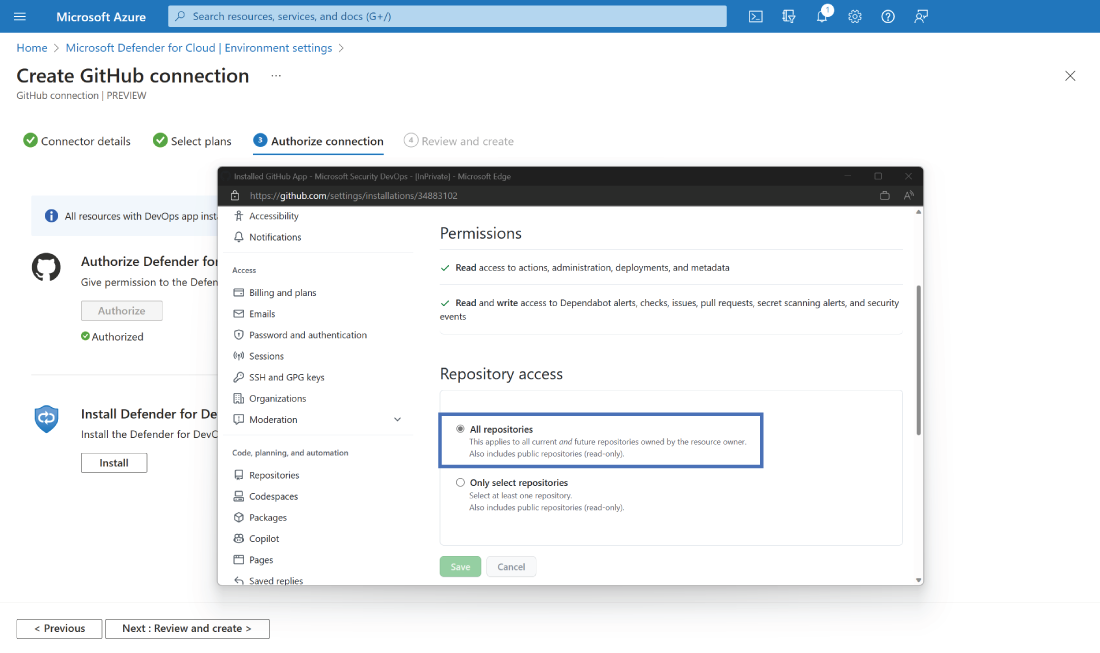
Use the dashboard figure to orient the GitHub repository onboarding flow and security connector setup. section 11.4.1
