A resource request specifies the minimum CPU or memory a pod requires. The scheduler uses these values to place the pod on a node with adequate capacity. section 4.2 section 4.2.1
Apply requests with these Kubernetes configuration rules:
- Define requests under a container's resources field in the pod YAML. section 4.2.1
- Set CPU and memory independently; either request can be omitted. section 4.2.1
- Use requests without limits, or limits without requests; Kubernetes copies limit values into requests when requests are absent. section 4.2.1
- Provide CPU requests before using CPU-utilization targets with the Horizontal Pod Autoscaler, because they establish the utilization baseline. section 5.1.5
Add a CPU request to a Deployment
Generate editable YAML with `kubectl run nginx2 --image=nginx --dry-run=client -o yaml > nginx2.yaml`, then place the request under the container's resources field: `resources:\n requests:\n cpu: 10m`. Apply a Deployment update with `kubectl apply -f deploy.yaml`, and verify the configured request with `kubectl get deploy nginx -o yaml`. section 4.2.1 section 5.1.5
Figure 4.13 Where to insert the resource requests for pods within the pod YAML
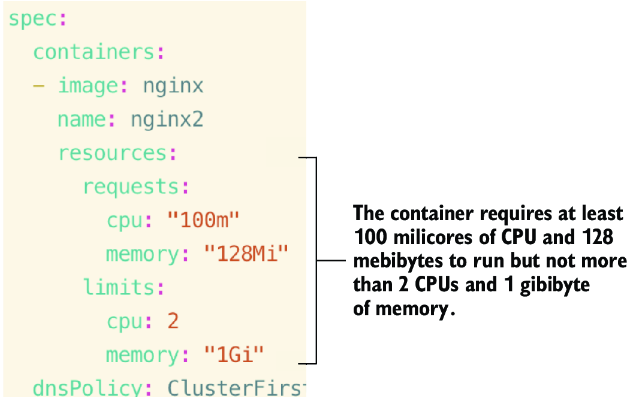
Use the YAML placement figure to locate the resources and requests fields inside a pod container specification. section 4.2.1

