Responsive data visualization adapts a chart or dashboard to different screen sizes and interaction contexts. Unlike ordinary responsive web layouts, visualizations must preserve readable labels, useful spacing, and accessible interactions as users move between phones, tablets, desktops, and changing orientations. section 9.0 section 9.2
Build responsive visualizations by combining layout strategies with chart-specific adjustments:
- Use an SVG viewBox without fixed width and height attributes to scale the chart container. section 9.2
- Resize dynamically with CSS media queries or JavaScript window resize events. section 9.2
- Keep labels readable by scaling text deliberately, reducing axis ticks, and removing secondary information on smaller screens. section 9.2 section 9.5
- Prioritize essential information on mobile, make touch targets comfortable, and allow horizontal scrolling when a chart needs substantial horizontal space. section 9.4
- Choose a mobile-first or desktop-first approach according to the chart and audience rather than applying one universal recipe. section 9.5
Responsive line chart and dashboard
A temperature line chart may scale correctly through its SVG viewBox yet still fail on small screens because labels become unreadable, axis labels crowd together, and dots lose spacing. A React dashboard provides a second case: responsive visualization principles still apply, even when the implementation uses components, props, state, and hooks. section 9.2 section 9.3
Figure 9.2 Responsive line chart
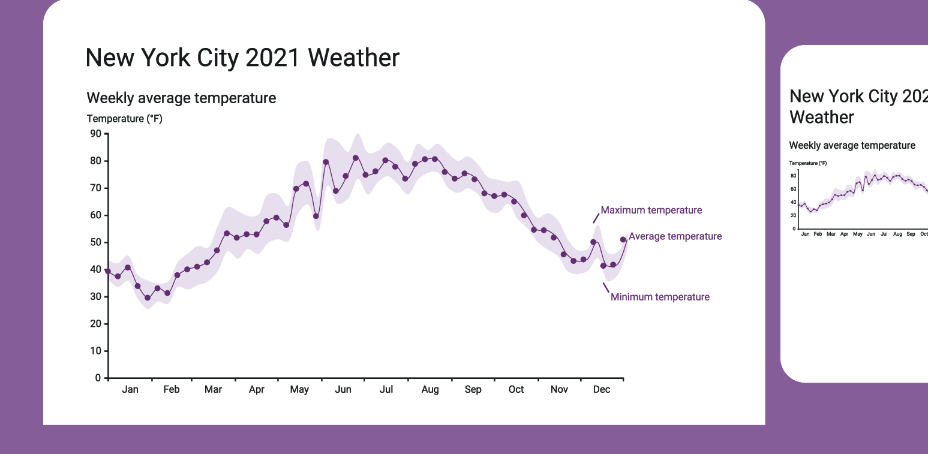
Compare the responsive line chart with its small-screen failure modes before and after layout adjustments. section 9.2
