A type scale is a set of font sizes related by a consistent progression. Start with readable body copy, then size headings and supporting text around it so the interface feels ordered and cohesive. section 8.2.4 section 10.4
Build a practical scale by making these decisions:
- Set body copy around 16–18px, then express sizes with relative units such as rem or em so users can adjust their browser’s base font size. section 8.2.4
- Use a calculator to explore proportional scales such as the golden ratio, major third, or perfect fourth, rather than calculating every value manually. section 8.2.4
- Check the result in the chosen typeface, because the same size can appear larger or smaller across different fonts. section 8.2.4
- Align typography with a 4pt spacing grid when building vertical rhythm, preserving smaller adjustment steps than an 8pt grid. section 10.4
A simple rem-based ramp
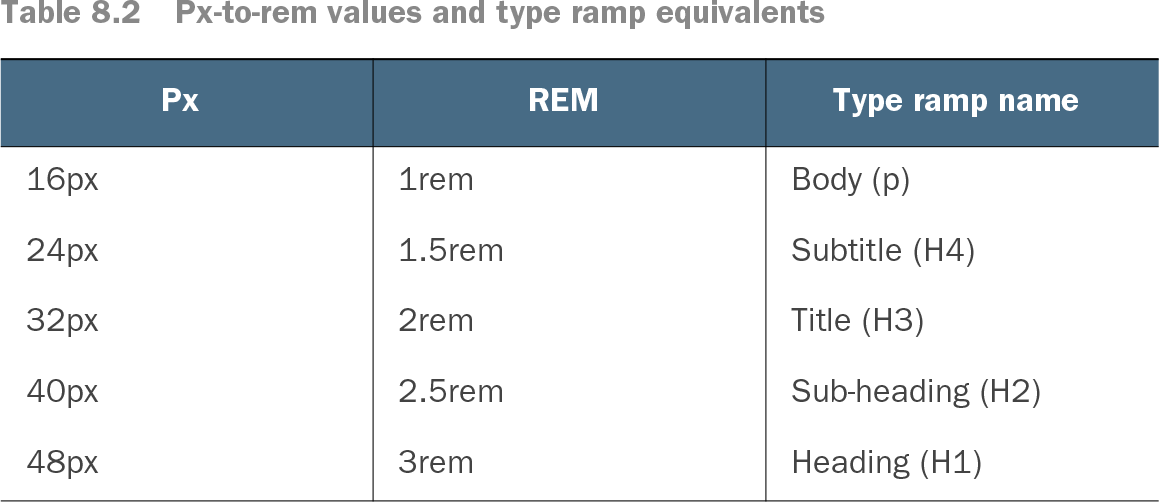
With a 16px base, body text can use 1rem, a subtitle 1.5rem, a title 2rem, a sub-heading 2.5rem, and a main heading 3rem. section 8.2.4
Table 8.2 Px-to-rem values and type ramp equivalents (view table figure)
Browse the complete px-to-rem type-ramp table for the body, subtitle, title, sub-heading, and main-heading sizes. section 8.2.4