A baseline is the invisible horizontal line on which typography sits. It establishes vertical rhythm, helping text, margins, padding, and interface components align consistently across a page. section 10.10 section 8.2.5
Use a baseline to make layout decisions systematic:
- Choose a baseline that fits the grid; a 4-point grid can use a 12px baseline. section 10.5
- Set line heights for each text size, then use baseline multiples to calculate margins and padding. section 10.10
- Adjust line height for readability, correcting spacing with margins when the resulting value no longer aligns to the grid. section 10.5
- Check headings and paragraphs visually, because line length and font choice also affect readability. section 10.5
A 12px baseline with a simple type ramp
Start with 16px body text. A 1.25 line-height produces 20px, so add 16px of top margin: 20 + 16 = 36px, a multiple of 12. A sample ramp uses 48px H1, 36px H2, 28px H3, and 16px paragraph text, with top margins of 60px, 48px, 25px, and 16px respectively. section 10.5
Figure 10.3 Our baseline for typography is 12px and doesn’t change at all. This baseline will establish our vertical rhythm and influence margin and padding for the rest of the UI components.
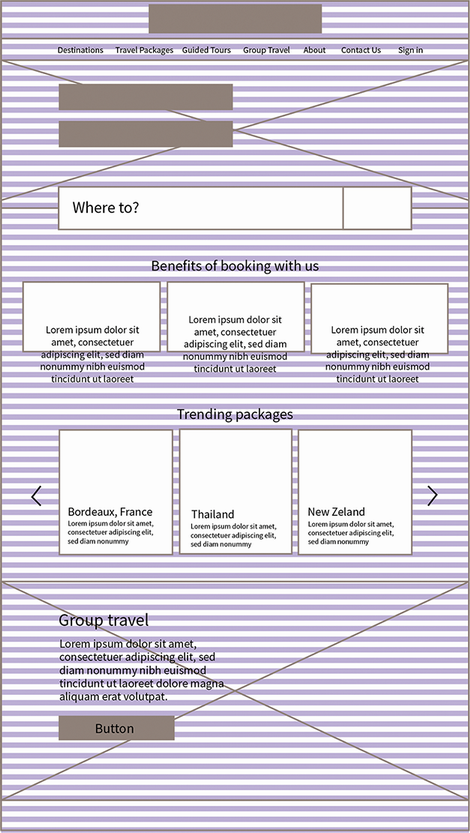
View the baseline spanning the page to see how one fixed measure guides typography, margins, padding, and component rhythm. section 10.5
