A role assignment grants a security principal the permissions in a role definition over a chosen Azure scope. It joins the “who,” “what,” and “on what” of Azure RBAC; removing the assignment removes that access. section 2.3.2 section 2.3.3
Choose scope carefully to limit breach impact. Assignments can apply at resource, resource group, subscription, or management group level; management groups are widest in reach and therefore carry the broadest effect. section 2.3.2
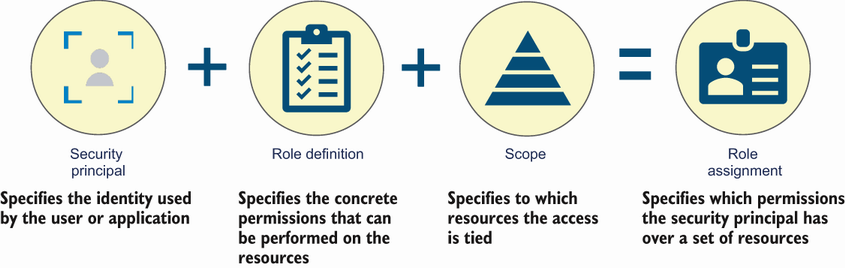
Use the component diagram to verify that every assignment names a security principal, a role definition, and a scope. section 2.3.3
Create an assignment with an account that has Owner or User Access Administrator status:
- Identify the assignee object ID for a user, service principal, or group. section 2.3.4
- Select a role by name or ID, such as Virtual Machine Contributor. section 2.3.2 section 2.3.4
- Set the target scope and run az role assignment create; inspect the resulting principal ID, role definition ID, and scope. section 2.3.4
Subscription-scoped VM access
Assigning Virtual Machine Contributor to a user at subscription scope lets that principal receive the permissions of that role across the selected subscription. The returned object records the principal, role definition, subscription, and scope. section 2.3.3 section 2.3.4
For privileged Azure roles managed through Privileged Identity Management (PIM), assignments can be permanent (active) or time-bound eligible. Eligible identities assume the role only when needed and can be required to use MFA or obtain approval during activation. section 2.6.2


