A role assignment grants an identity a defined set of permissions at a chosen scope. It combines three decisions: who receives access, what the identity may do, and where those permissions apply. section 6.7.3
Choose each part deliberately:
- Select a security principal, such as a user, service principal, or managed identity. section 6.6.2 section 6.7.3
- Select a role definition, preferably a built-in role such as Contributor when its permissions fit the job. section 6.7.3
- Set the scope at management-group, subscription, resource-group, or resource level; narrower scopes limit the assignment’s reach. section 6.7.3
Giving an application deployment access
After creating a service principal, open the target resource or resource group’s Access Control (IAM), add a role assignment, choose Contributor, and select the service principal. The application can then authenticate with its client ID, tenant ID, and secret and manage applicable resources without placing credentials in plaintext configuration. section 6.6.2
Connecting AI Foundry to storage
Assign the AI Foundry workspace’s managed identity the Storage Blob Data Contributor role on the storage account. This lets its pipelines list, read, and write blobs in the reviews container while keeping the permission tied to the required resource. section 7.4.2
Figure 6.35 Choosing a built-in role, if possible, is the best choice for RBAC.
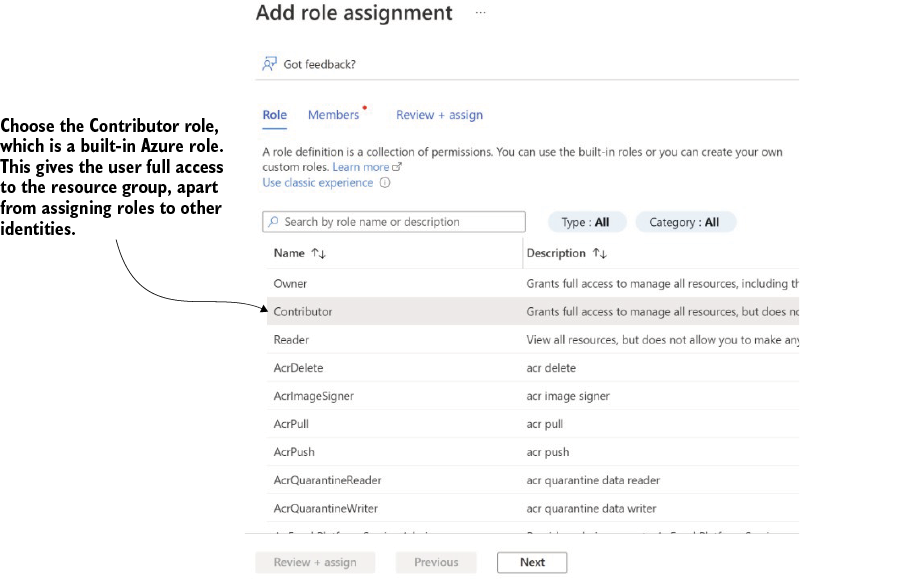
Use the role-selection view to compare a built-in role with the assignment’s intended permissions before granting access. section 6.7.3


