A root task starts an orchestrated data pipeline. It is the scheduled entry point of a task graph, while dependent tasks run only after predecessor tasks complete successfully. A root task can log pipeline startup, send notifications, or perform setup before ingestion and transformation begin. section 13.3
Use a root task to establish the pipeline’s operational boundary:
- Schedule the root task; dependent child tasks do not require individual schedules. section 13.3
- Place ingestion and transformation tasks after the root task, including independent tasks that can run in parallel. section 13.3.1
- Attach a finalizer task to record completion, status, errors, or notifications after the graph finishes. section 13.3 section 13.3.3
Scheduled pipeline start
A pipeline can create PIPELINE_START_TASK with the BAKERY_WH warehouse, a ten-minute test schedule, and an email notification containing the execution timestamp. Child tasks then reference it with AFTER and may use stream-data conditions. section 13.3.2
Figure 13.2 Tasks and their dependencies in the task graph. The pipeline starts with a root task named PIPELINE_START_TASK, executes the data ingestion and transformation steps in sequence, and ends with a finalizer task named PIPELINE_END_TASK.
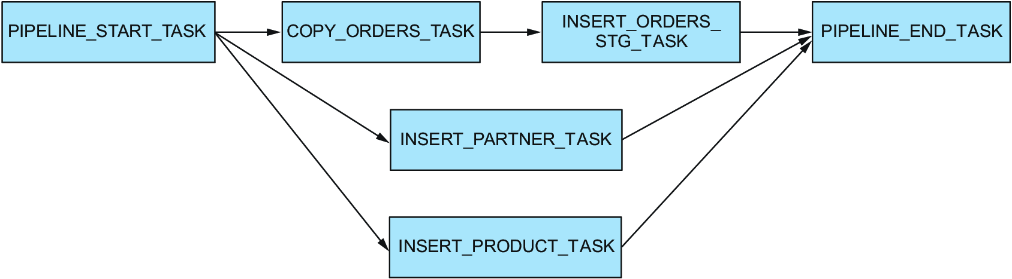
Inspect the dependency graph from PIPELINE_START_TASK through ingestion and transformation tasks to PIPELINE_END_TASK. section 13.3.1
After building the graph, resume the tasks and use EXECUTE TASK on the root task for immediate execution instead of waiting for its schedule. Check TASK_HISTORY() to confirm successful, skipped, or failed steps; suspend the root task to stop scheduled executions. section 13.3.3 section 13.3.4
