Routing answers a practical question: when the URL changes, which view or components should appear? In a single-page application, the router updates the view and address bar without reloading the entire application. section 1.3.2
Break routing into these responsibilities:
- Load the initial HTML, JavaScript, and CSS bundles before the application mounts. section 1.3.2
- Choose the components associated with the current route and create the application view through the Document API. section 1.3.2
- Handle navigation by replacing the displayed content instead of requesting a complete page from the server. section 1.3.2
- Distinguish SPA routing from server-side rendering: an SSR router selects components on the server for the requested route, which becomes HTML before hydration. section 1.3.3
One navigation flow
A browser first requests a mostly empty HTML page. JavaScript mounts the application and creates its initial view. When the user navigates to another route, the router selects the new content, updates the view, and changes the address bar without reloading the whole application. In an SSR application, that route instead causes the browser to request a newly rendered HTML page, which is later hydrated to become interactive. section 1.3.2 section 1.3.3
Figure 1.9 SPA navigation among routes
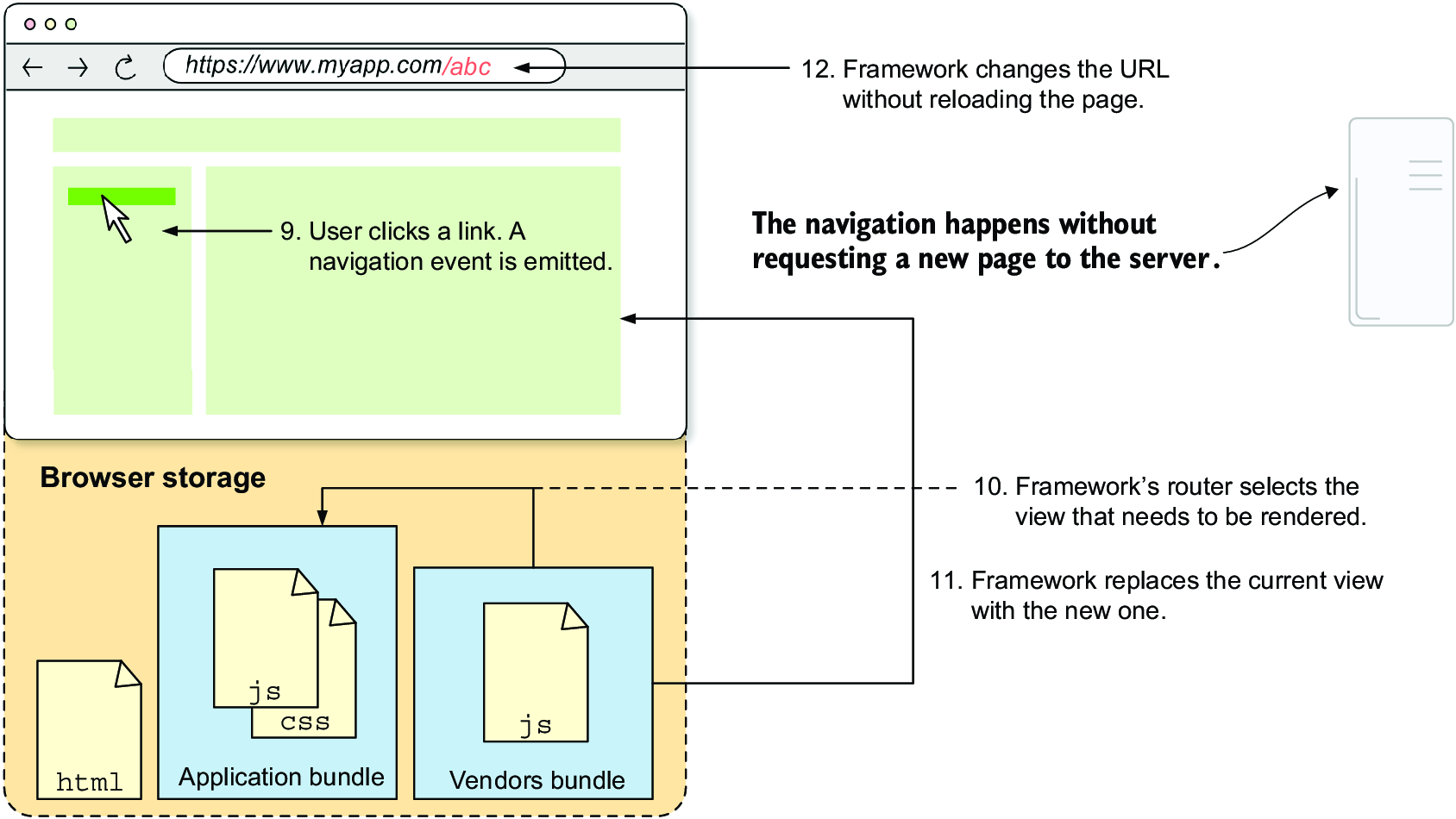
Follow the route-to-route navigation flow in an SPA. section 1.3.2





















