A routing table is a router’s database of known destinations and forwarding instructions. Each route indicates whether to send a packet directly to a destination, forward it to a next hop, or receive it because the destination is the router itself. Without routes, a router cannot forward packets. section 9.0 section 9.2.1
When a router receives a frame addressed to its MAC address, it examines the packet’s destination IP address and looks for a suitable route. If no suitable route exists, it discards the packet. Among matching routes, it chooses the most specific one—the route with the longest prefix length. section 9.2 section 10.3
Common routing-table entries include:
- Connected routes, marked C, describe networks attached to an up/up interface and allow direct forwarding to hosts on those networks. section 9.2.1 section 9.4
- Local routes, marked L, describe the exact IP address configured on a router interface. Their /32 prefix identifies one address, so matching traffic is received by the router rather than forwarded. section 9.2.1 section 9.4
- Static routes are manually configured; dynamic routing protocols allow routers to exchange information and build tables automatically. IPv6 uses the same core table concepts. section 17.0 section 21.2
Reading a Cisco routing table
Configure R1’s G0/0 as 192.168.1.1/24 and G0/1 as 192.168.2.1/24, then enable both interfaces. The command show ip route displays C 192.168.1.0/24 and C 192.168.2.0/24 as connected routes, plus L 192.168.1.1/32 and L 192.168.2.1/32 as local routes. A packet destined for 192.168.2.11 matches the connected 192.168.2.0/24 route and leaves through G0/1. section 9.2.1 section 9.2
Figure 9.3 R1 receives a packet from PC1 and forwards it to PC3. (1) R1 receives a frame on its G0/0 interface. The frame is addressed to R1’s own MAC address, so it examines the packet inside. (2) R1 looks up the packet’s destination IP address in its routing table. 192.168.2.11 is in the 192.168.2.0/24 network, so it selects that route to forward the packet. (3) R1 encapsulates the packet in a new frame destined for PC3’s MAC address and forwards it out of the interface specified by the route (G0/1).
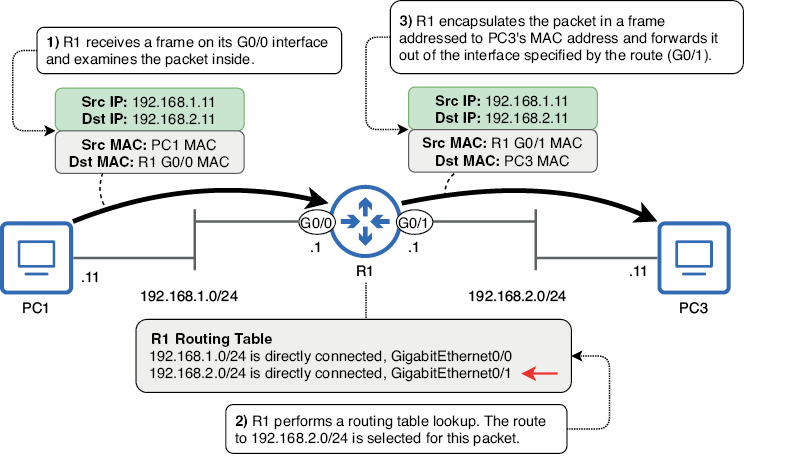
Trace the complete forwarding sequence from R1 receiving PC1’s frame through selecting 192.168.2.0/24 and sending a new frame toward PC3. section 9.2
Use show ip route to inspect the table, route codes, interface associations, and whether a gateway of last resort exists. Remember that an interface with an IP address and up/up status automatically contributes one connected route and one local route. section 9.2.1 section 9.4
