A router connects different networks, especially a local area network (LAN) to external networks such as the internet. Unlike a switch, which connects devices within a LAN, a router usually sits at the LAN edge and provides the default gateway for remote destinations. section 2.2.3
Routing forwards packets between networks. A router receives a frame addressed to its own MAC address, removes the frame encapsulation, examines the packet’s destination IP address, and searches its routing table. It forwards the packet when a suitable route exists; otherwise, it discards the packet. section 9.2 section 10.3
Key router behaviors include:
- Selects the most specific matching route, meaning the route with the longest prefix length. section 10.3
- Re-encapsulates the packet in a new frame addressed to the next hop or destination host’s MAC address. section 9.2 section 10.3
- Uses ARP to learn the MAC address needed for the next hop or final destination. section 10.3
- Makes Layer 3 forwarding decisions from destination IP addresses rather than MAC addresses. section 7.3
Forwarding from one LAN to another
PC1 sends a packet for PC3 to its default gateway, R1, in a frame addressed to R1’s MAC address. R1 examines the destination IP address, matches 192.168.2.11 to the 192.168.2.0/24 route, creates a new frame for PC3’s MAC address, and sends it through G0/1. section 9.2
Figure 2.5 Two LANs connected to the internet via a router at the edge of each LAN
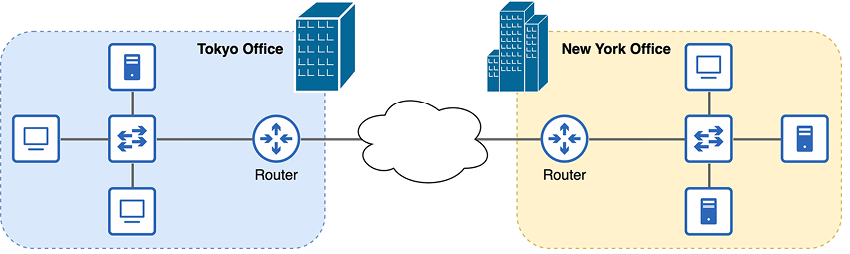
Use the network diagram to visualize routers at the edges of two LANs connecting those LANs to the internet. section 2.2.3
Figure 9.3 R1 receives a packet from PC1 and forwards it to PC3. (1) R1 receives a frame on its G0/0 interface. The frame is addressed to R1’s own MAC address, so it examines the packet inside. (2) R1 looks up the packet’s destination IP address in its routing table. 192.168.2.11 is in the 192.168.2.0/24 network, so it selects that route to forward the packet. (3) R1 encapsulates the packet in a new frame destined for PC3’s MAC address and forwards it out of the interface specified by the route (G0/1).
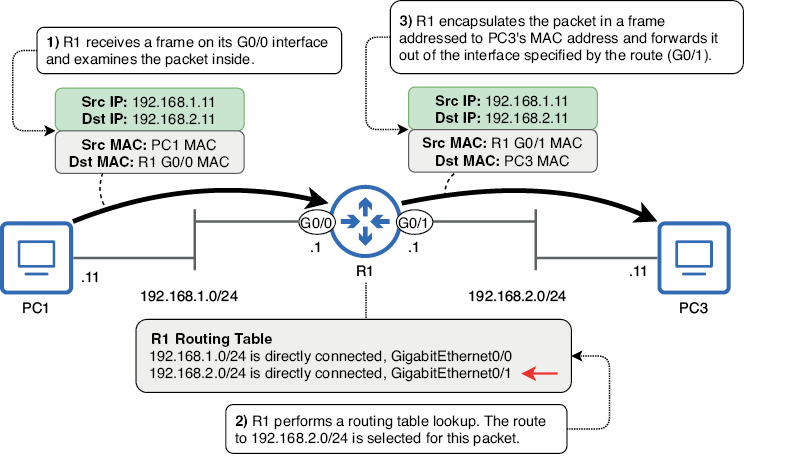
Use the forwarding diagram to trace frame reception, routing-table lookup, route selection, re-encapsulation, and outgoing interface selection. section 9.2
