A Sankey diagram visualizes quantities flowing between adjacent sets of nodes. Each connector, or link, becomes wider as the quantity it represents increases, allowing several categorical transitions to be read in one graphic. section 3.7
Build a Sankey diagram by turning sequential categorical relationships into node and link data:
- Prepare categorical variables, using transformations such as truncation and case_when() to create usable groups like <20, 20-39, and 40-59. section 3.7
- Count each adjacent pair of categories with count(), such as country and college attendance, age and position, or draft segment and win-share group. section 3.7
- Create a nodes data frame containing category names and a links data frame containing source, target, and value columns. section 3.7
- Render the result with sankeyNetwork(), specifying Links, Nodes, Value, NodeID, fontSize, and nodeWidth. section 3.7
NBA draft-flow analysis
A first-round NBA draft analysis can connect birthplace, college attendance, draft-entry age, position, pick segment, and win-share group. The resulting flow shows that most players were born in the United States, attended college, entered between ages 19 and 22, and played forward or guard. Only a fraction accumulated many win shares, with most of those players selected in the 1-5 pick segment. section 3.7
Figure 3.5 A sample Sankey diagram created for illustrative purposes only. The vertical rectangles are nodes, and the bands connecting a pair of nodes are links. The width of the links is a representation of quantity. In this example, more text messages are sent than emails, more men receive some type of digital communication than do women, and most men then respond affirmatively, whereas most women do not.
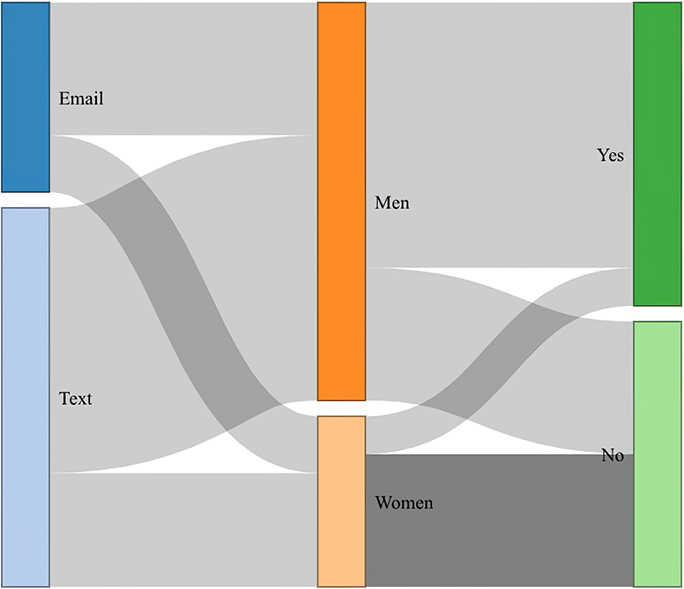
Use the diagram to compare link widths across stages: the illustrative campaign example contrasts communication channels, gender groups, and affirmative responses. section 3.7
