A scatter matrix plot, also called a pair plot, places scatterplots in a grid so you can compare several numerical variables pair by pair. It helps inspect relationships, possible correlations, and unusual points across grouped business data. section 3.3.2 section 4.3
Use the plot to inspect:
- Whether variables move together, such as average product price and average payment value. section 4.3
- Whether freight value relates differently to price or payment value. section 4.3
- Whether outliers may reflect data errors, unusual circumstances, or genuine extremes requiring investigation. section 4.3
Product performance by state
After grouping records by product category and state, calculate average product price, freight value, and payment value. Pass the resulting average_values DataFrame to seaborn.pairplot with state as the hue. The resulting grid compares the three averages across categories and regions. A nearly linear price–payment relationship is visible, while freight relationships appear less linear. Treat those patterns as prompts for investigation rather than proof that one variable causes another. section 3.3.2 section 4.3
import seaborn as sns

# Create a pair plot with different colors for each state
g = sns.pairplot(data=average_values, hue='state', markers='.')

# Set the title and labels for each plot
g.fig.suptitle(
"Scatterplot Matrix of Average Values by State and Product Category",
y=1.02)
g.set_axis_labels(
"Average Product Price", "Average Freight Value",
"Average Payment Value")

# Adjust legend
g.add_legend(title="State")

# Show the plot
plt.show()
Run the seaborn pairplot workflow to color observations by state, label the figure, add a legend, and inspect the grouped averages. section 3.3.2
Figure 3.4 Scatterplot of relationships between average payment values, average freight values, and average product prices
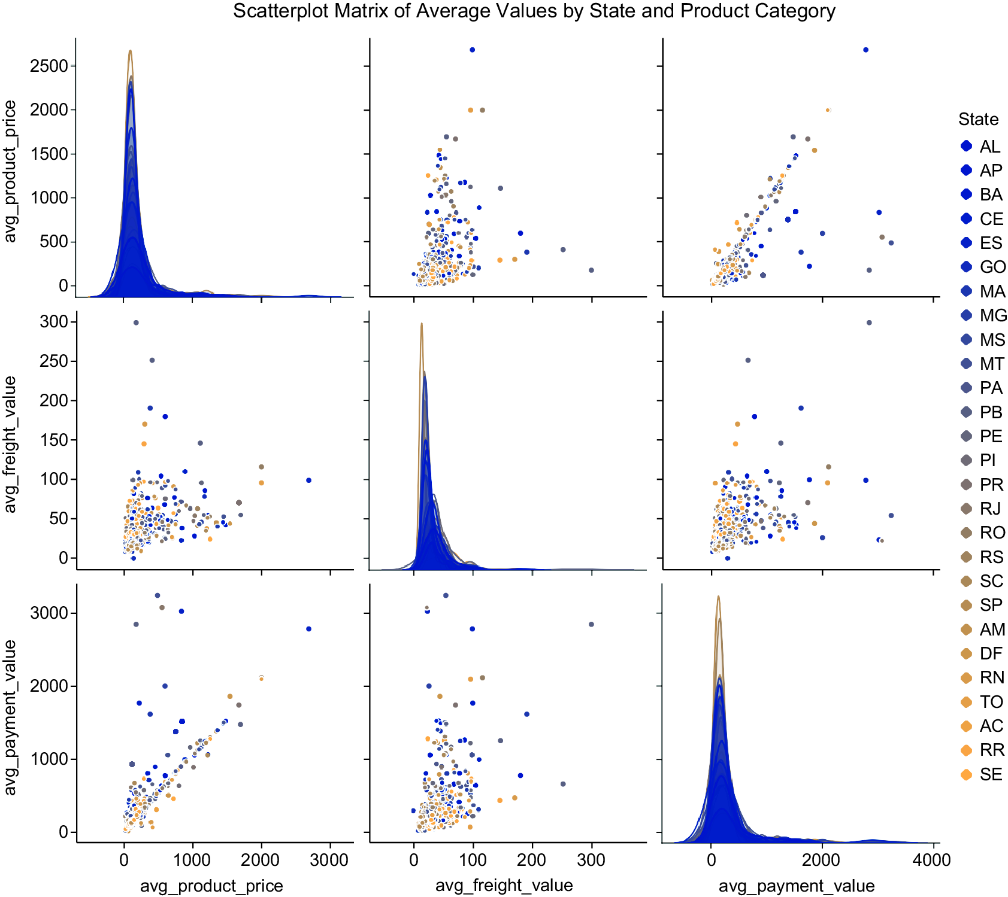
Use the rendered scatterplot to compare average payment values, freight values, and product prices visually. section 3.3.2

