A scoped service gives you one instance within a dependency-injection scope and a different instance in another scope. In ASP.NET Core, each HTTP request has its own scope. Use this lifetime when services handling one request should share an object, but later requests need a fresh one. section 9.4.2
Register the service before building the application: `builder.Services.AddScoped<DataContext>();`. The container then supplies `DataContext` wherever it is required in that request’s dependency graph. section 9.4.2 section 9.1
One context per request
Suppose an endpoint receives `DataContext` directly and also receives a `Repository` that depends on `DataContext`. The context’s row count is set when that object is created. With `DataContext` registered as scoped, both paths report the same count during one request. A later request receives a new context and can report a different count. `Repository` can remain transient in this example. section 9.4 section 9.4.2
Figure 9.8 Scoped dependencies use the same instance of DataContext within a single request but a new instance for a separate request. Consequently, the RowCounts are identical within a request.
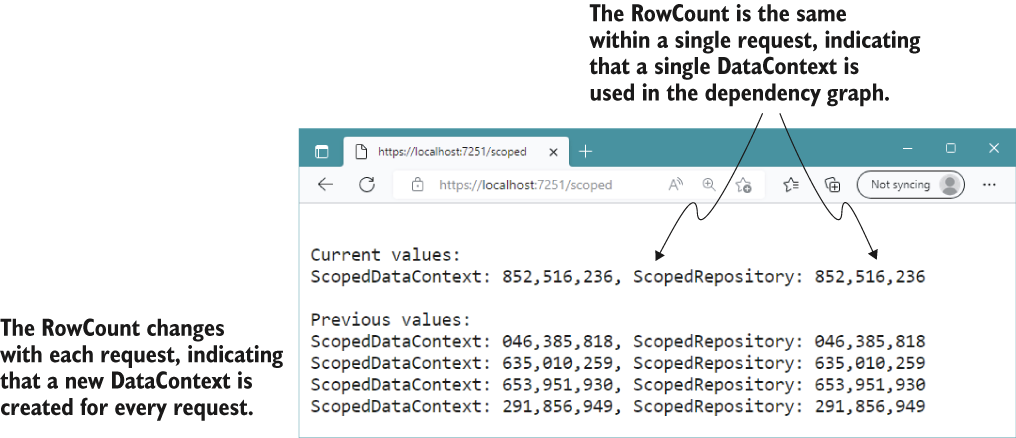
Follow the two paths to DataContext within each request: they share an instance, while the next request uses another. section 9.4.2
Choose and manage the lifetime with these distinctions in mind:
- Transient creates an instance each time the service is requested; singleton reuses one instance across scopes. Scoped sits between them, sharing within a scope only. section 9.4
- Database contexts and services tied to HTTP-request details are common scoped candidates. Scoped or transient services implementing `IDisposable` are disposed of when their scope ends. section 9.4.2
- Do not inject a scoped dependency into a singleton that holds onto it: the singleton can keep using that dependency across requests. `ValidateScopes` can detect captive dependencies; it is enabled by default in development. section 9.4.4
Outside an HTTP request, such as during startup in `Program.cs`, create a scope yourself with `CreateScope()` or `CreateAsyncScope()`. Resolve the service through that scope’s `ServiceProvider`, then dispose the scope. This releases scoped and transient services resolved from it. section 9.5
Listing 9.14 Resolving a scoped service using IServiceScope in Program.cs
WebApplicationBuilder builder = WebApplication.CreateBuilder(args);

builder.Services.AddScoped<DataContext>();                          #1

WebApplication app = builder.Build();

await using (var scope = app.Services.CreateAsyncScope())           #2
{
    var dbContext =                                                 #3
        scope.ServiceProvider.GetRequiredService<DataContext>();    #3
    Console.WriteLine($"Retrieved scope: {dbContext.RowCount}");
}                                                                   #4

app.Run();
The startup example registers `DataContext`, creates an async scope, resolves the context from that scope, and disposes it before `app.Run()`. section 9.5


