A script module packages related PowerShell functions, classes, and variables so they can be shared across automations instead of recreated inside individual scripts. It turns general-purpose automation building blocks into a reusable unit that teammates can extend together. Script modules can also supplement base or gallery modules without modifying compiled cmdlets or upgrade-sensitive code. section 2.2
A module without compiled code is a script module. At its simplest, it is a PowerShell file saved with the .psm1 extension, but a maintainable module also uses a .psd1 manifest. The manifest records module details, controls which functions or variables are public, and carries a version number. section 2.2.2
Organize a reusable script module around a stable loading and versioning structure:
- Give the top-level folder, .psm1 file, and .psd1 manifest the same module name so standard Import-Module loading can locate it. section 2.2.2
- Place releases in folders named for their version, allowing multiple versions of the same module to exist on one computer. section 2.2.2
- Keep the .psm1 as a loader and place functions in separate .ps1 files rather than one oversized module file. section 2.2.2
- Use Public and Private folders when functions need different visibility; load the relevant files from the module loader and handle loading failures. section 2.2.2
Turning log cleanup into FileCleanupTools
A log-cleanup automation can import FileCleanupTools, calculate an archive date, find older files, build an archive path with Set-ArchiveFilePath, compress the files, and remove the archived originals with Remove-ArchivedFiles. Moving those reusable tasks out of the operational script leaves the script focused on its inputs and workflow. section 2.2.2
Encapsulating a process report
Get-TopProcess accepts a required TopN parameter, retrieves processes, sorts them by CPU use, selects the requested count, and formats ID, process name, and CPU output. A function like this is a candidate for a module when several automations need the same report. section 2.2
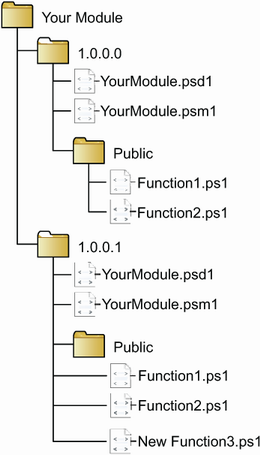
This folder diagram helps verify the name-and-version layout used to make a script module loadable and to retain multiple releases. section 2.2.2
