When game balance lives inside a scene’s GameObject, changing a value can affect the scene that other team members use. A ScriptableObject moves that editable data into a separate Unity project asset. The choice of where to edit balance data still depends on the team: Google Sheets supports early, simultaneous design work, while ScriptableObjects support local development and testing in Unity. section 9.1 section 9.7
Listing 9.1 The balance ScriptableObject
[CreateAssetMenu(fileName = "BalanceSO", menuName = "DOD/BalanceSO", order = 1)]
public class BalanceSO : ScriptableObject
{
    public int NumEnemies;
    public float EnemyVelocity;
    public float EnemyRadius;
    public float SpawnRadius;
    public float PlayerVelocity;
    public float MinCollisionDistance;
    public float SpawnTime;
}
A BalanceSO class inherits from ScriptableObject, exposes enemy, player, and spawn values, and uses CreateAssetMenu so a balance asset can be created in the project. section 9.1
The asset is an editing source, not necessarily the final runtime layout. In a larger game, separate ScriptableObjects can hold core settings and individual enemy types. Parsing combines them into runtime balance data, including arrays of enemy data. section 9.1
Figure 9.3 In a larger game, the complete balance can come from multiple ScriptableObjects. Here, one holds the core settings, while others define individual enemy types. During parsing, we combine their data into the runtime balance and store the enemy data in arrays.
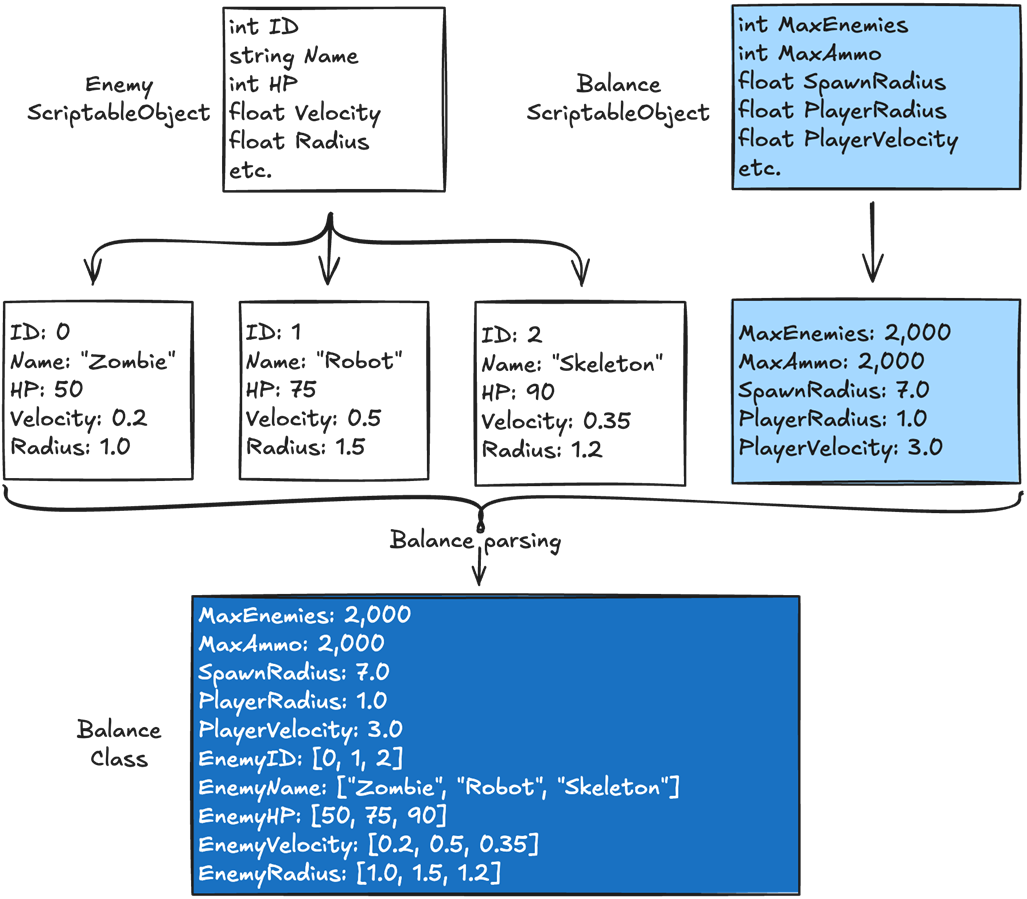
The diagram shows core and enemy-type assets feeding a combined runtime balance. section 9.1
Validate values while parsing—for example, check that a required positive value exceeds zero. Runtime code can then trust the parsed data instead of repeating that branch check. Engineers can use temporary asset values during development; designers can supply final values, and QA can make local changes to test edge cases. Use ScriptableObjects alone or alongside Google Sheets according to the project’s editing needs. section 9.7
