A secondary color is created by mixing two primary colors. Purple, for example, combines red and blue. The color wheel makes this relationship easy to identify. section 9.2.1
In a user interface palette, a secondary color supports the primary color without competing with the main message or action. It can color a logo or other supporting element while keeping attention on the headline and call to action. section 9.5
Apply a secondary color deliberately:
- Choose a vibrant primary color for the main headline, principal call to action, and important states. section 9.5
- Use the secondary color for supporting identity, such as a logo, so it does not draw attention away from the primary action. section 9.5
- Reserve additional colors and gray swatches for secondary information, text hierarchy, and subtle interface contrast. section 9.5
A rental landing page
A rental landing page uses its most vibrant color for the headline, search button, and checked checkboxes. Its secondary color colors the logo, while another color highlights information tiles without distracting from the search action. section 9.5
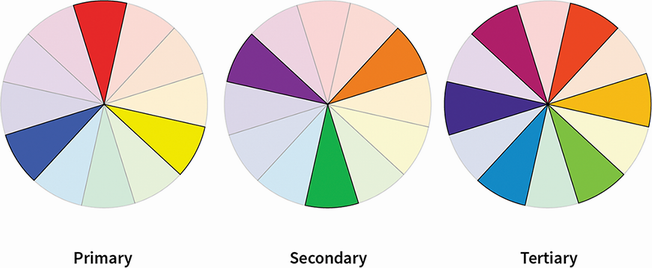
Use the color-wheel figure to distinguish primary, secondary, and tertiary colors at a glance. section 9.2.1

Use the applied palette figure to see how a secondary color fits into a complete landing-page color system. section 9.5
