SeedProd is a WordPress plugin for keeping an unfinished site presentable and for designing visitor-facing pages. Its Coming Soon page can replace regular pages for visitors while an administrator continues to view and work on the real site. An Under Construction screen is also available for updates, though taking an established site offline can cost visitors. section 2.4 section 5.1
Install it from Plugins > Add New: search for “seedprod,” then select Install and Activate. Open SeedProd > Landing Pages, choose the page to edit, and use the design screen to replace placeholder text and add blocks. Save the page, then check its public appearance in a browser that was not used to configure the plugin. section 2.4
Figure 2.2 Click Landing Pages under SeedProd, and then click the Edit Page button to customize your coming soon page.
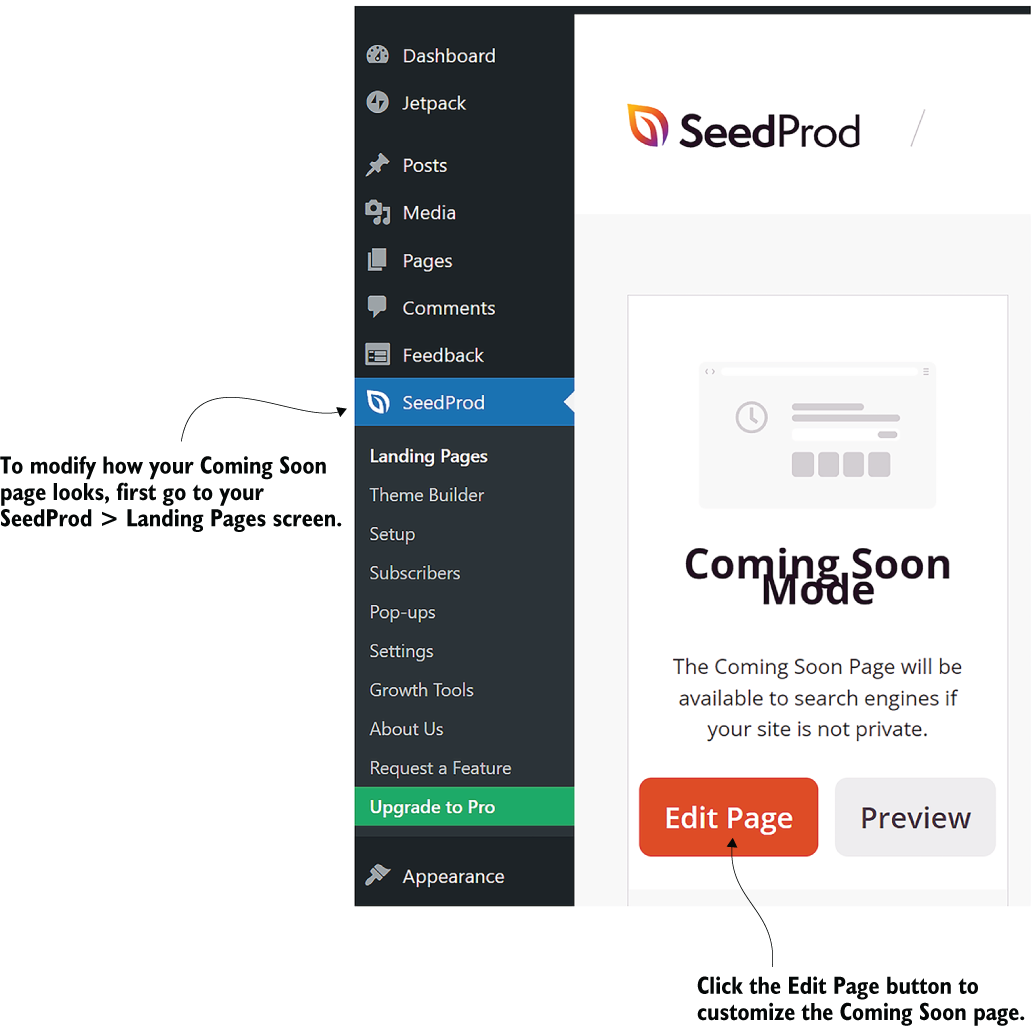
Use the Landing Pages entry and Edit Page control as the starting point for customizing a coming soon page. section 2.4
Beyond temporary visitor screens, SeedProd can support page design with:
- A drag-and-drop page builder for arranging layout and page elements. section 5.1 section 6.3
- Predesigned home-page and page templates, including more than 150 templates that can be applied to individual pages. section 5.1 section 6.3
- Premium email integration, SEO and analytics settings, WooCommerce integration, and subscriber management. section 5.1
Use one theme with varied page designs
Rather than rely on multiple active themes for a blog, catalog, or other differently styled pages, use SeedProd’s templates and drag-and-drop builder to give individual pages distinct designs. This provides a multi-template approach while avoiding the maintenance, performance, and compatibility concerns associated with multi-theme plugins. section 6.3
