Seldon is an open-source platform for deploying and managing machine-learning models in production, particularly in Kubernetes environments. Its central capability here is the inference graph: a request can pass through an encoder, LLM, classifier, and combiner without requiring a separately built interface for every model. section 6.2.4
Inference graphs support several useful deployment patterns:
- Sequential graphs run one model after another, such as an encoder generating embeddings before an LLM receives the request. section 6.2.4
- Ensemble graphs combine outputs from several models, while routing graphs direct traffic to selected models according to criteria. section 6.2.4
- Separating the API from the LLM makes prompt, feature, and bug changes possible without redeploying the LLM itself. section 6.2.4
A Kubernetes inference graph
A SeldonDeployment defines containers for an encoder, LLM, classifier, and combiner, then expresses their relationships as a graph. The Kubernetes custom resource extends a regular Deployment and adds an orchestrator that coordinates communication in graph order. The combiner appears as the parent of the LLM and classifier because each component has one parent but may have multiple children. section 6.2.4
Figure 6.8 The three types of inference graph building blocks. Sequential allows us to run one model before the other, which is useful for preprocessing steps like generating embeddings. Ensembles allow us to pool several models together to learn from each and combine their results. Routing allows us to send traffic to specific models based on some criteria, often used for multi-armed bandit optimization.
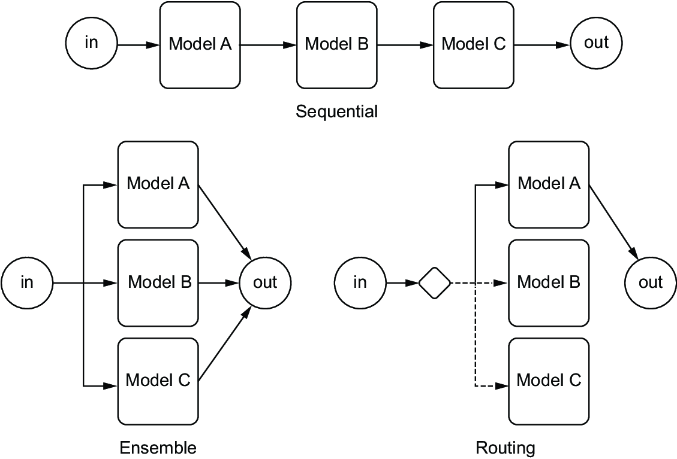
Use the graph-building-block diagram to compare sequential, ensemble, and routing arrangements before designing a deployment. section 6.2.4
Figure 6.9 An example inference graph deployment using Seldon. A Seldon Deployment is a Kubernetes CRD that extends a regular Kubernetes deployment and adds an orchestrator that ensures the proper communication between all the models are run in graph order.
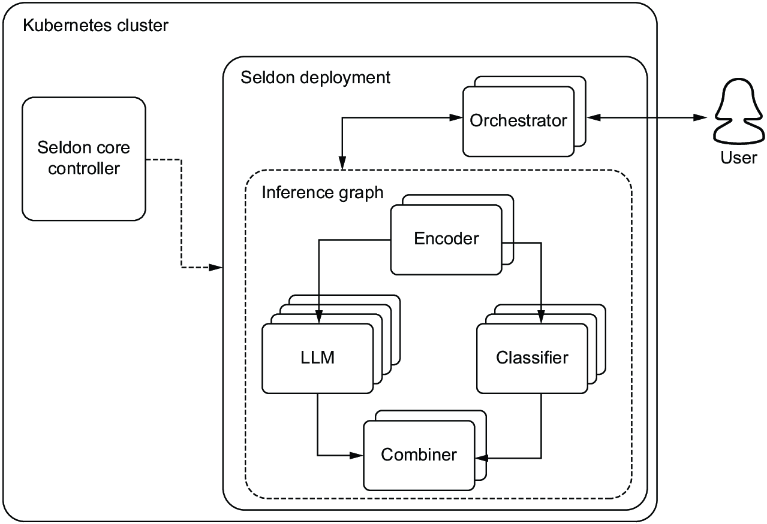
Use the deployment diagram to see how a Kubernetes custom resource adds orchestration for model communication. section 6.2.4
