SELECT starts a query and says what you want to see. Think of a table like a spreadsheet: SELECT names the column or expression to return, while FROM names the data set to look in. A basic request reads almost like English: “select Name from vegetables.” section 2.2 section 2.4
Show one column from a table
To see the names stored in the vegetables table, write: SELECT Name FROM vegetables; Name is the column to retrieve, and vegetables is the table. SQL needs both pieces of information: what to select and where to select it from. Use the column’s actual name, not a conversational plural such as Names. section 2.2 section 3.1.1
A reliable first-query checklist:
- Put the data you want immediately after SELECT. section 3.1.1
- Put the table or other data set after FROM. section 2.4 section 3.1.1
- Keep SELECT before FROM; reversing them causes a syntax error. section 3.1.1
- End the statement with a semicolon. section 2.4
SELECT can do more than return table columns. A SELECT clause can contain a subquery, but that is rarely the best way to get a result because each subquery adds work for the database. SELECT can also assign and display a user-defined variable, which can help verify that a calculated value is correct before using it in another query. section 11.3.2 section 13.3.4 section 13.4.1
Inspect a value while assigning it
This query assigns the earliest 2021 order date to a variable and displays the assigned value in the results: SELECT @FirstOrderDate := MIN(OrderDate) FROM orderheader WHERE OrderDate BETWEEN '2021-01-01' AND '2021-12-31'; Seeing the value can help catch an incorrect variable value before a later query uses it. section 13.3.4
Figure 2.5 A vegetables table with two columns and five rows. We’re going to learn how to create a query that shows the names of all the vegetables.
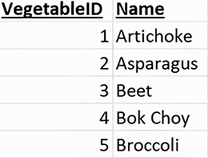
Use the small vegetables table to connect a column name such as Name with the values a SELECT query returns. section 2.2




