liveBook · Manning

D3.selectAll

As explained in D3.js in Action, Third Edition

selectAll() is a D3 selection method that creates a selection of all document elements matching a specified selector within the current selection.

d3.selectAll() creates a D3 selection containing every DOM element that matches a CSS-style selector. Use it when a visualization must manipulate multiple elements rather than only the first match returned by d3.select(). section 2.3 section 2.7

Build selectors with the same forms used in CSS:

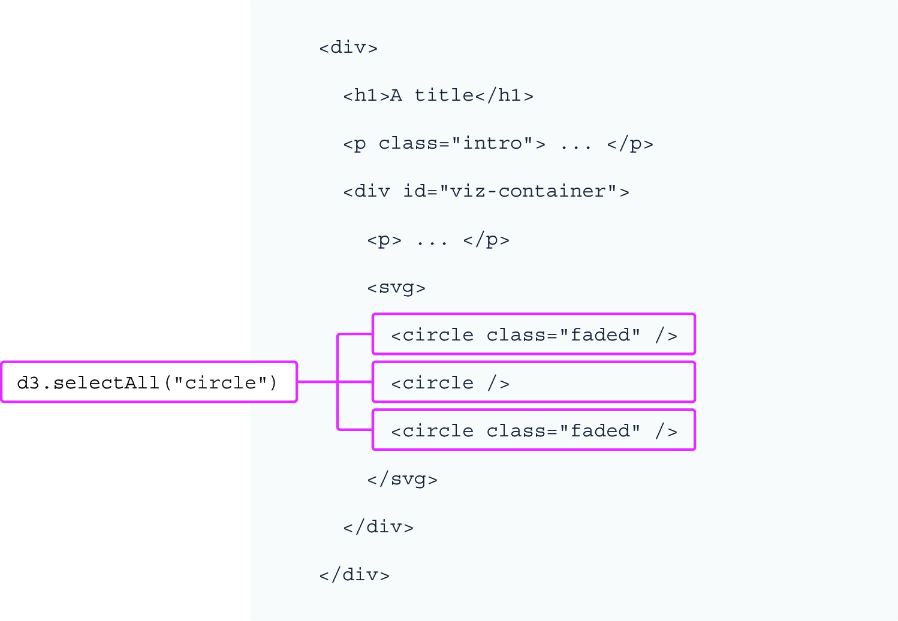
  • Select every circle with d3.selectAll("circle"). section 2.3
  • Combine tag, class, and ID selectors, such as d3.selectAll("h1, .intro"). section 2.3
  • Chain selectAll() to a parent selection to limit matching to that selection. section 3.3

Create one bar for each datum

A bar chart can begin with an SVG selection and an empty selection of rectangles: svg.selectAll("rect").data(data).join("rect"). The selector identifies the elements to bind, data() supplies the dataset, and join("rect") creates one rectangle for each row. section 3.3 section 3.6

Figure 2.7 DOM elements returned by the d3.selectAll() method
figure

Visualizes the DOM elements returned by d3.selectAll(). section 2.3

How D3.js in Action, Third Edition covers it

How deep it goes
Defines CSS-selector matching, contrasts first-match selection, and demonstrates empty selections for data binding without detailing selection internals.
Examples
Uses circles, grouped h1 and class selectors, and a bar chart that creates 33 rectangles from dataset rows.
What you can do after
Apply it via D3 to select matching elements, chain data() and join(), and create SVG elements for a dataset.
How it connects
Connects CSS selectors, DOM manipulation, D3 selections, data binding, join(), SVG elements, and bar charts.

Related concepts

This explainer was generated by Manning's knowledge graph from the text of D3.js in Action, Third Edition. The section links point to the parts of the book it draws on.