A sharing API invokes the operating system’s sharing mechanism, letting users send content or data to a chosen application or service. .NET MAUI exposes a common abstraction across supported platforms, so an app can share without implementing separate integrations for email, SMS, social media, and other targets. section 3.1
Use a sharing API through this application flow:
- Collect the content to share, such as a message and a URL. section 3.2
- Request or verify any permissions required to obtain the content; the FindMe! example checks location permission first. section 3.2
- Create a share request with a subject, title, text, and URI. section 3.2
- Call the sharing API so the operating system presents eligible target applications for the user to choose. section 3.1
FindMe! location sharing
A user enters a name and clicks Find Me. The app verifies location permission, obtains the current location through the location API, builds a Bing Maps URL from latitude and longitude, and calls Share.RequestAsync with a ShareTextRequest. The operating system then lets the user choose a registered sharing target. section 3.2
Figure 3.5 All supported OSs provide a sharing API. When an app calls that API, the user is presented with a list of apps that have registered as target applications and can choose to share the content being provided by the host application with the target application.
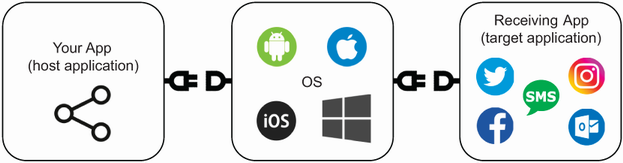
Shows how the operating system lists applications registered as sharing targets after the host app invokes its sharing API. section 3.1
The abstraction supports sharing from an app but not registering that app as a sharing target. Registering a target requires platform-specific code because .NET MAUI does not provide a unified API for it. section 3.1
