shutdown is a Cisco IOS interface-configuration command that administratively disables an interface. Router interfaces are disabled by default, while switch interfaces are enabled by default. section 8.1 section 8.4
Use shutdown to manage interface availability and reduce unnecessary exposure:
- Disable unused switch ports; this is a security best practice. section 8.1
- Use no shutdown to enable a router interface that is disabled by default. section 8.1
- Remember that switch ports normally start enabled for plug-and-play operation. section 8.1
Disabling unused switch ports
On SW1, apply shutdown to interfaces that are not connected to devices. This administratively disables those ports and follows a recommended enterprise security practice. section 8.1
Figure 8.1 Interface configurations on R1 and SW1: (1) configuring R1’s G0/1 interface with an IP address, description, and manual speed and duplex settings; (2) configuring SW1’s G0/1 interface with a description, and manual speed and duplex settings; (3) configuring SW1’s connections to end-user devices (PCs) using autonegotiation; (4) disabling SW1’s unused interfaces.
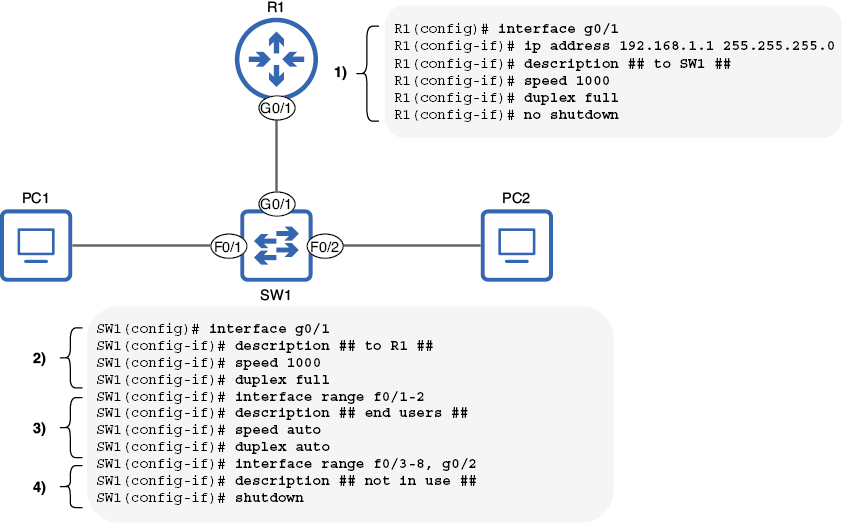
Compare router and switch interface configurations, including enabled interfaces, manually configured settings, autonegotiated connections, and disabled unused ports. section 8.1
