An SNMP Set request asks an SNMP agent to change one or more variables in a managed device’s Management Information Base (MIB). The agent applies the change and returns a Response message, allowing an NMS to manage devices centrally without logging into each device’s CLI. section 6.1.1 section 6.4
Key behavior and limits include:
- A Set can change interface status, add configuration such as a DNS server, initiate a reboot or shutdown, or trigger a configuration backup. section 6.1.1
- The SNMP manager sends the request to the agent on UDP port 161; the agent returns a Response to the manager on UDP port 162. section 6.1.2
- SNMPv1 and SNMPv2c require a read-write (RW) community string for Set requests; a read-only (RO) string permits Get operations but rejects changes. section 6.3.1
Centralized interface and device configuration
An NMS can send a Set request to R1 to change G0/1 to Up, equivalent to configuring no shutdown. It can also use Set requests to add a new DNS server across multiple routers instead of entering ip name-server on each CLI. section 6.1.1
Figure 6.2 An SNMP Set and Response exchange. (1) The NMS sends a Set message instructing R1 to change its G0/1 interface to Up. (2) R1 changes G0/1’s status as instructed. (3) R1 sends a Response message to the NMS.
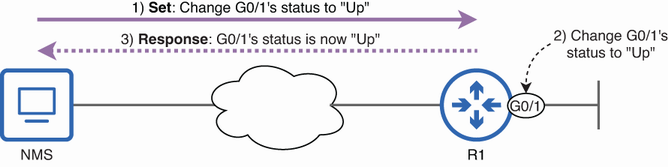
Trace the Set-and-Response exchange from the NMS request through the interface change to the agent’s reply. section 6.1.1
