A game with several menus and a gameplay board needs one place to coordinate what runs and what appears on screen. A singleton gives those Unity objects access to the same controller: place one Game object in the scene and call Game.Instance from a menu or the board. section 5.1.1
Game drives the game loop, holds GameData and Balance, and manages menu initialization, visibility, and Tick() calls. For a menu change, it asks Logic to update MenuState, then hides the old menu and shows the new one. section 5.1.1
Calling the shared controller
When gameplay ends, a Unity-facing object can call `if (gameOver) Game.Instance.GameOver();`. The call reaches the same Game object used by the menus and board. section 5.1.1
Keep the convenient access within clear boundaries:
- Menus and the board may call Game because they are Unity objects. section 5.1.1
- Logic functions should not call the singleton or read hidden global state. Pass in the data they need and return results, so gameplay logic remains independent and testable. section 5.1.1
- If assets come from bundles, the resources folder, and addressables, use separate source-specific asset-manager singletons. That makes an asset’s origin easier to identify and debug. section 7.2.3
Figure 5.3 The game loop with a single script, Game, controlling everything. Now it’s trivial for us to figure out what code is running and when, because we are controlling the flow in the game loop, instead of relying on Unity, a black box, to control it for us.
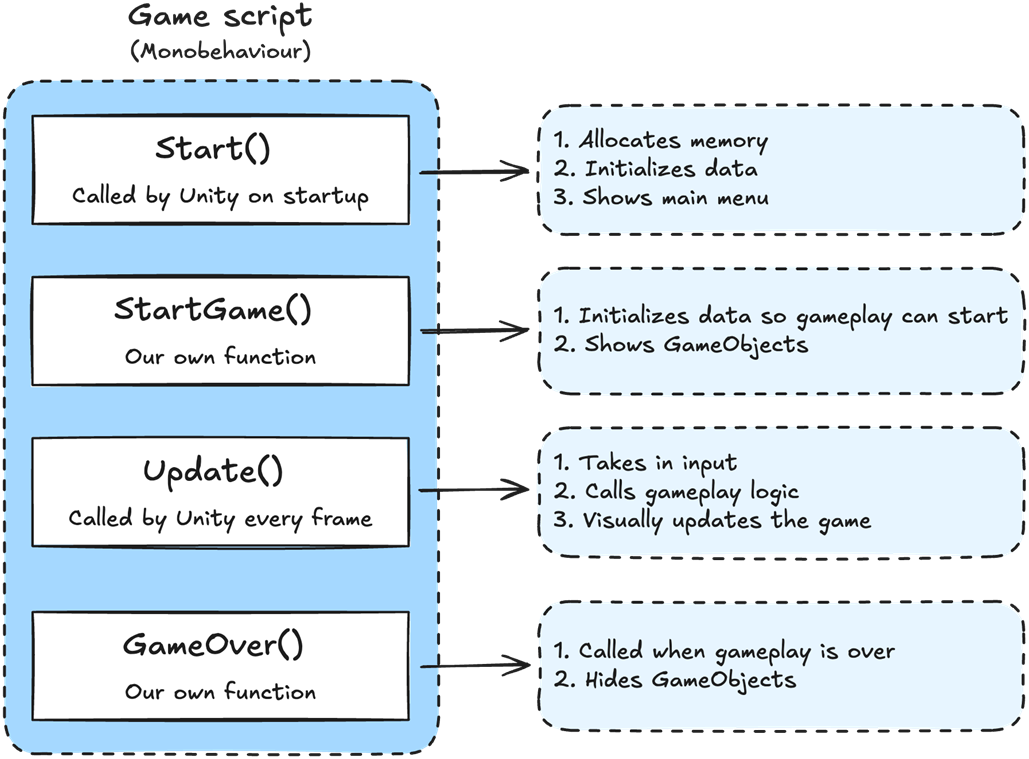
The diagram contrasts a single Game-controlled loop with relying on scattered Unity lifecycle callbacks to determine execution order. section 5.1.1