A slide note changes a note's pitch gradually from its starting pitch toward a target pitch. In FamiStudio, right-click a note and choose Slide Note, then move the target up or down. section 14.2.1 section 15.1.2
Build a rising zap sound with these steps:
- Enter Recording Mode, add a single E5 note, and play it to verify the starting sound. section 14.2.1
- Right-click the E5 note and select Toggle Slide Note; playback should rise, initially sounding more like a siren. section 14.2.1
- Drag the target at the top right of the lighter note area down to F3, then play the result as a zap. section 14.2.1
A two-part explosion
On the noise channel, add G2 and E2. Make G2 three times longer than E2, turn both into slide notes, and set their targets to C3 and A2. The result is a longer rising noise sound followed by a shorter rising sound. section 14.2.3
Figure 14.9 E5 note sliding to F3 equals a nice zap sound.
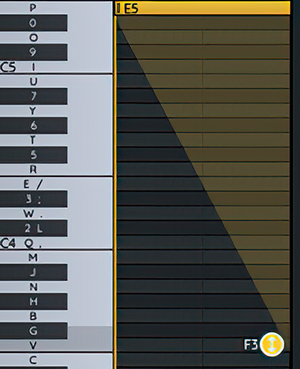
Use the diagram to compare the E5 starting note with its F3 slide target and the resulting zap shape. section 14.2.1
