A sound effect is a short audio event that gives a game action an audible response: a laser can zap, an enemy hit can boom, and a lost life can trigger a larger explosion. On the NES, sound comes from five hardware channels with different basic waveforms. Although the hardware can be programmed directly, a sound editor plus its playback engine provides a simpler route from designed sound to game output. section 14.0 section 14.5
Create effects in FamiStudio, then export them as CA65 source data for the sound engine. The generated data contains separate sound-effect entries, including NTSC versions, and the export summary reports the ROM bytes each effect needs. Include that generated source with the game code before requesting playback. section 14.2 section 14.3.1 section 14.3
Build a simple effect by shaping a short pattern rather than recording a sample:
- For a laser zap, use one Square 1 pattern with a one-unit song length, 200 BPM, two notes per pattern, and two notes per beat. Enter an E5 note, enable slide, and slide it down to F3 to make the pitch fall like a zap. section 14.2.1
- For a boom, use the Noise channel with one pattern containing 10 notes. Alternate E1 and D#1 over four adjusted-length notes so the noise changes pitch like a brief explosion. section 14.2.2
Figure 14.9 E5 note sliding to F3 equals a nice zap sound.
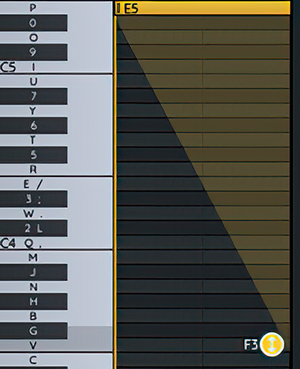
Use the completed sliding-note view to verify the zap’s essential shape: an E5 note descending to F3. section 14.2.1
Keep playback behind a small routine such as play_sfx. Pass the chosen effect number in the A register; the routine preserves X and Y, selects the sound-effect data, chooses a logical channel, and calls the FamiStudio playback routine. This lets gameplay code trigger audio at the same point it handles an event. section 14.4
Attach effects to game events
When the player presses fire and a bullet sprite is available, select channel 0 and play effect 0 for the zap. After a bullet hits an enemy and the score changes, select channel 1 and play effect 1 for the boom. Play effect 2 on channel 1 when the player loses a life; the same big boom can also accompany a smart bomb hitting the ground. Separate logical channels allow the next zap to start without cutting off the boom. section 14.4 section 14.5
Test each effect in the editor before export, then compile and run the game to check that each action produces its intended sound. A reused effect is acceptable while building the game, but a distinct smart-bomb explosion can be created, exported, and assigned its own effect number later. section 14.2.1 section 14.4
