FamiStudio is a cross-platform music tracker and audio development tool for creating NES music and sound effects. It is easier for beginners than FamiTracker and includes a lightweight playback engine for games. section 2.5.2
Set up FamiStudio for an NES development workflow:
- Download the application for Windows, Linux, or macOS from famistudio.org. section 2.5.2
- Download the NES Sound Engine and choose the CA65 engine when using CA65-based game code. section 2.5.2
- Create or adapt projects, generate music data, and connect that data to the game's music engine. section 15.0 section 15.6
Building a laser zap
Create a new project named CH_SFX.fms. Set the song length to 1, BPM to 200, and both notes per pattern and notes per beat to 2. On Square 1, create Pattern 1, enable Recording Mode, and add an E5 note. Toggle Slide Note on that note, then adjust its destination to F3 and play it back. The rising-to-falling pitch produces a laser-like zap; playback uses nine display frames per note on NTSC or PAL timing. section 14.2 section 14.2.1
A FamiStudio project can contain songs, instruments, DPCM samples, and arpeggios. Songs contain patterns assigned to the NES APU's five channels; patterns contain notes played by instruments, with envelopes modulating pitch, volume, or arpeggio. section 15.1 section 15.6
Figure 2.12 FamiStudio
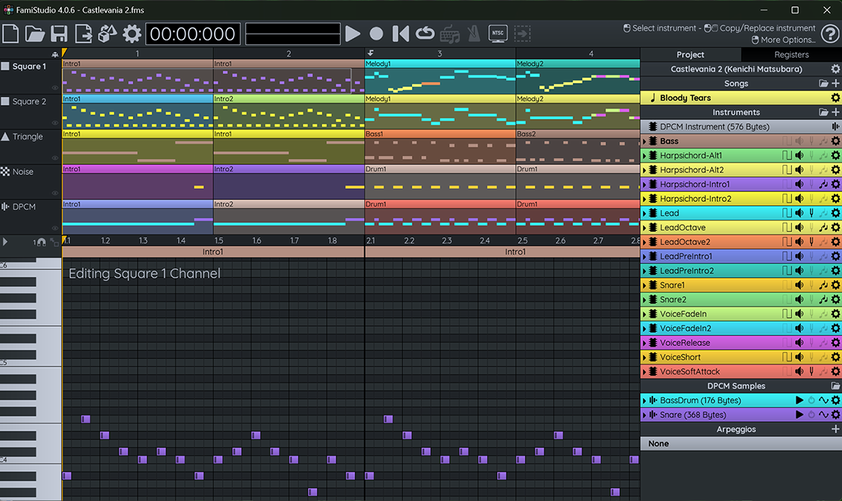
Use the project-structure figure to orient the main FamiStudio components before building music or sound effects. section 2.5.2
