An SNMP Trap is an unsolicited notification from a managed device to an NMS when a defined event occurs, such as an interface failure or excessive temperature. Unlike periodic Get requests, it lets the device report events immediately. section 6.1.1
Understand Trap behavior and its relationship to surrounding SNMP components:
- The SNMP agent on the managed device sends the Trap; the SNMP manager on the NMS listens for it on UDP port 162. section 6.1.2
- A Trap is unacknowledged: the NMS does not return a Response, so delivery is not confirmed. section 6.2.3
- An Inform serves the same notification purpose but requires acknowledgment and retransmission; prefer it over a Trap when using SNMPv2 or SNMPv3. section 6.2.3
- An SNMP application may display the Trap, log it, or alert an administrator by email or SMS; those administrator alerts are outside SNMP itself. section 6.1.1 section 6.2.3
Enable Cisco IOS Trap delivery
R1(config)# snmp-server enable traps R1(config)# snmp-server host 192.168.1.10 version 2c password789 The first command enables all Trap messages. The second identifies the NMS, selects SNMPv2c, and sets the community string carried in Trap messages. Trap types can instead be limited, for example with "snmp-server enable traps cpu". The host command's community string controls outgoing Trap and Inform messages and need not match the strings used for Get or Set access. section 6.3.1
Figure 6.3 Notifying the NMS with a Trap message. (1) R1 G0/1 goes down. (2) R1 notifies the NMS of the event with a Trap message. (3) The NMS notifies an admin via an email or SMS text message.
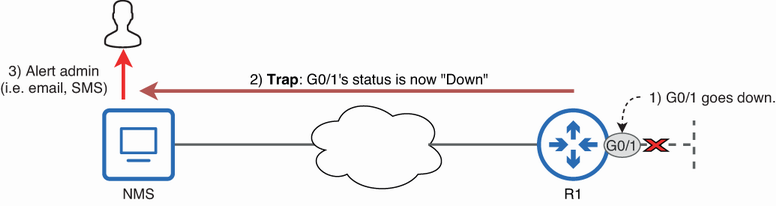
Trace the interface-down event from the managed device to the NMS and then to an administrator alert. section 6.1.1
