Snowpark is Snowflake’s application-development layer for data engineering. It runs Python, Java, or Scala code natively in Snowflake while providing client API libraries to connect, query tables, transform data, and deploy functions or stored procedures. Its central data structure is the data frame; API operations are translated internally into SQL and executed in Snowflake. section 6.0 section 6.8
Use Snowpark when SQL alone is not the best fit for a pipeline step, or when application code needs supported open-source libraries. It can automate ingestion, implement transformations and validation, create reusable procedures, and prepare data for downstream reporting, machine learning, or LLM workflows. section 1.1.2 section 1.2.2 section 1.5
A Snowpark Python workflow can proceed as follows:
- Install a supported local Python version, create a virtual environment, and install snowflake-snowpark-python with pip or conda. section 6.3.1
- Create a Session with account and user context, including an optional role, warehouse, database, and schema; close it when finished. section 6.3.2
- Submit SQL through session.sql(), remembering that the returned data frame is lazy until an action such as collect(), count(), show(), or save_as_table(). section 6.3.4
- Use data-frame methods to read, transform, and write data, or serialize functions and stored procedures for secure server-side execution. section 6.8
Automating CSV ingestion
A local orders CSV can be uploaded to an internal stage with session.file.put(). Define its StructType schema, read the staged CSV into a data frame, then use copy_into_table() to load an ORDERS_STG table. This replaces manual stage uploads while retaining a COPY-style loading flow. section 6.6
Building a holiday-aware date dimension
Generate dates in Python, use the holidays package to flag country-specific holidays, create a data frame with date and Boolean fields, and save it to Snowflake. The resulting dimension can be joined to orders to plan holiday demand. section 6.4 section 6.2
Figure 6.5 Comparison of two pipelines: the first pipeline includes a manual step where a bakery employee uploads a file to an internal stage; the second pipeline uses Snowpark to automate uploading a file into an internal stage and executes the COPY command to load the data into the staging table in Snowflake.
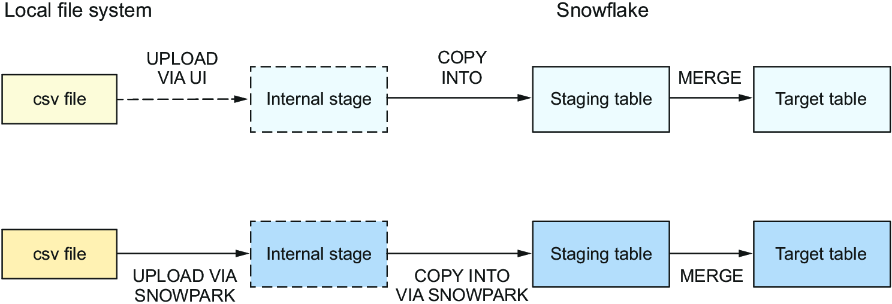
Compare the manual file-upload pipeline with the Snowpark-driven pipeline that uploads to an internal stage and loads the staging table. section 6.6
Choose a Snowsight Python worksheet for quick creation, execution, and deployment. Prefer local development with the Snowpark SQL API when a shared codebase needs source control, versioning, branching, and automated deployments. Keep credentials out of code and repositories; supply them through configuration files or secrets instead. section 6.8 section 6.3.2
