A sound effect channel is an independent playback slot for NES sound effects. Selecting different channels lets effects play simultaneously instead of interrupting one another. section 14.3.2
Configure the sound engine with the number of simultaneous effect streams, initialize it with the exported sound data, and update it every video frame. Effects can override music on the channels they use, while the music resumes afterward. section 14.3.2
Use channels according to whether an effect should continue independently:
- Assign the firing zap to the first channel. section 14.4
- Assign an enemy-hit boom to the second channel so a later zap does not stop it. section 14.4
- Reuse the second channel for the player-loss and smart-bomb effects when they should play immediately. section 14.4
Playing an effect on a selected channel
Store the desired channel in sfx_channel, place the effect number in A, and call play_sfx. The helper preserves X and Y before invoking famistudio_sfx_play, so surrounding game logic keeps its register values. section 14.4
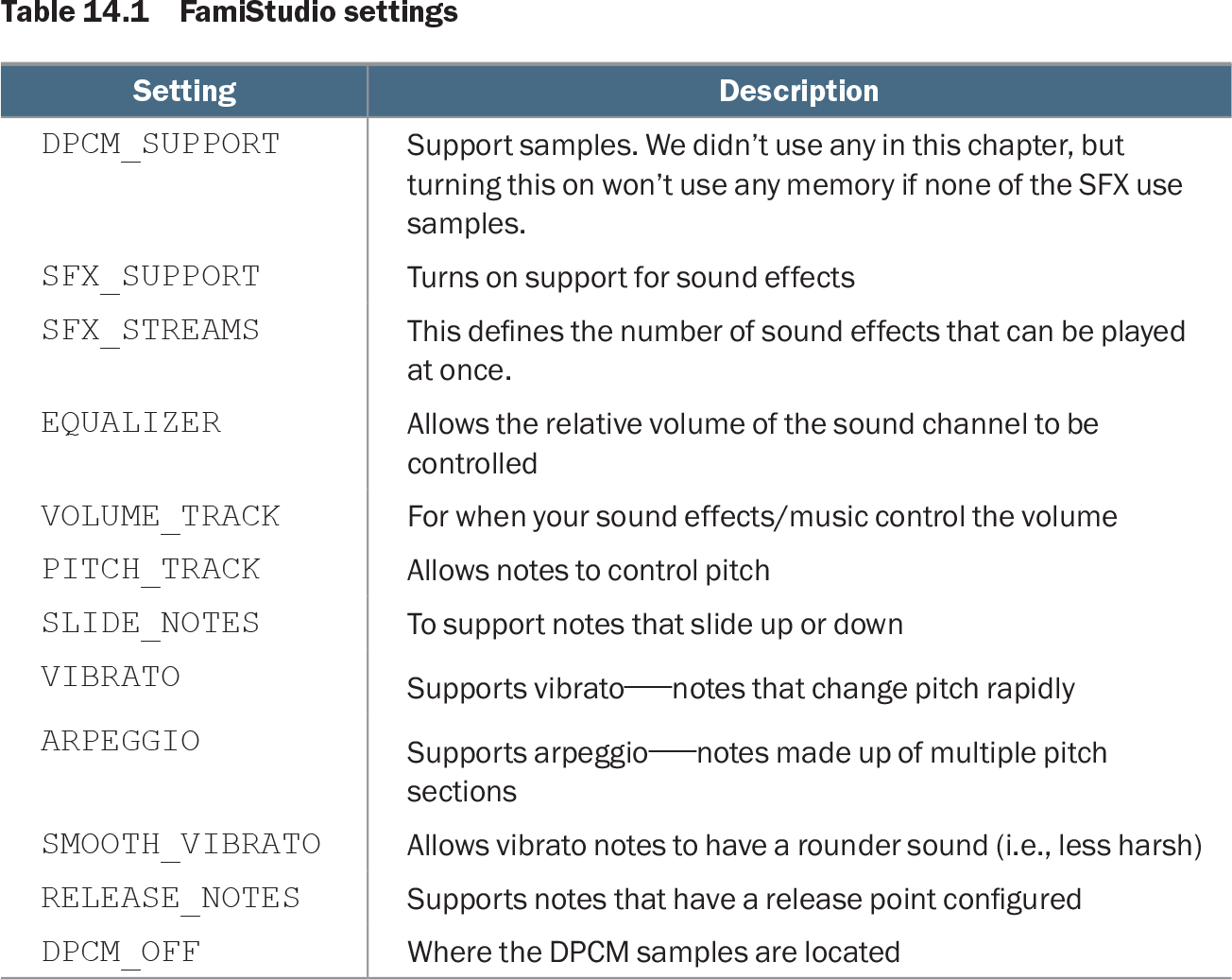
Table 14.1 FamiStudio settings (view table figure)
| Description |
|
|---|---|
| DPCM_SUPPORT |
Support samples. We didn’t use any in this chapter, but turning this on won’t use any memory if none of the SFX use samples. |
| SFX_SUPPORT |
Turns on support for sound effects |
| SFX_STREAMS |
This defines the number of sound effects that can be played at once. |
| EQUALIZER |
Allows the relative volume of the sound channel to be controlled |
| VOLUME_TRACK |
For when your sound effects/music control the volume |
| PITCH_TRACK |
Allows notes to control pitch |
| SLIDE_NOTES |
To support notes that slide up or down |
| VIBRATO |
Supports vibrato—notes that change pitch rapidly |
| ARPEGGIO |
Supports arpeggio—notes made up of multiple pitch sections |
| SMOOTH_VIBRATO |
Allows vibrato notes to have a rounder sound (i.e., less harsh) |
| RELEASE_NOTES |
Supports notes that have a release point configured |
| DPCM_OFF |
Where the DPCM samples are located |
Use the configuration table to see how SFX_STREAMS determines the number of effects that can play at once and which sound features consume resources. section 14.3.2