liveBook · Manning

Source map

As explained in Web Components in Action

A source map is a mapping file that relates generated code locations to their original source-code locations.

A source map connects locations in generated code with the original source files. Its .map file stores lookup information so browser errors can point back to source lines instead of bundled output. section 12.4

Debugging a bundled component

Build a component with Rollup’s -m flag, then trigger an error in the generated bundle. The browser can identify the exact line in the original source file, even though the application runs the bundle. section 12.4

Figure 12.4. Source maps show where an error occurred in your source files, even when bundling output.
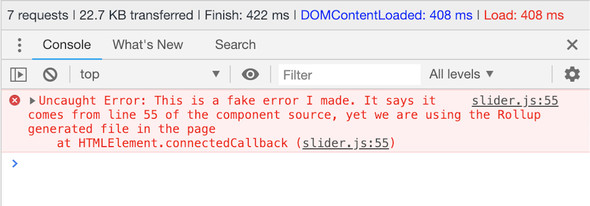
Use the figure to see how source maps reveal original source locations during bundled-output errors. section 12.4


How Web Components in Action covers it

How deep it goes
Explains the mapping file and its lookup role, then demonstrates error localization without detailing the mapping format.
Examples
Uses a Rollup command with -m and a forced error displayed against the original source.
What it assumes
Assumes source files are bundled into generated output and introduces source-map generation through Rollup’s -m flag.
What you can do after
Diagnose/debug bundled applications by tracing generated-code errors back to original source lines.
How it connects
Connects source maps with Rollup, bundling, generated output, browser errors, and ES6 modules.

Also explained in

Compare how 2 books explain source map →

Related concepts

This explainer was generated by Manning's knowledge graph from the text of Web Components in Action. The section links point to the parts of the book it draws on.