A spoofing attack deceives an authentication system by presenting an imitation of a legitimate identity or signal. Server impersonation is a familiar case: a fake bank site copies the real site’s appearance and captures passwords or payment details, especially during phishing or on open Wi-Fi networks. section 10.2.3
Common spoofing patterns include:
- Fake fingerprints or three-dimensional masks that trick biometric sensors. section 15.4
- Photos, videos, or AI-generated data presented as a real person during authentication. section 15.4
- A lookalike website that imitates a trusted hostname or login page. section 10.2.3
TLS reduces server impersonation by requiring a secure site to present a digital certificate during the handshake. The browser checks expiration, the trusted certificate authority’s signature, and the hostname. An expired, forged, or mismatched certificate triggers a warning or blocks the connection. section 10.2.3
Recognizing the safer authentication pattern
A browser connecting to https://bank.com should verify that the certificate is issued for bank.com and signed by a trusted CA, rather than trusting the page’s logo. For biometric login, secure hardware can hold a mathematical template instead of the original face or fingerprint. Hardware keys add stronger protection by signing challenges and binding responses to the original website, so a visually identical phishing site receives no valid response. section 10.2.3 section 15.4
Figure 10.11 Browsers indicate a secure TLS connection with a padlock icon next to the URL. Clicking the icon reveals certificate details, such as the issuing CA, the site’s public key, and verification that your connection is encrypted and secure.
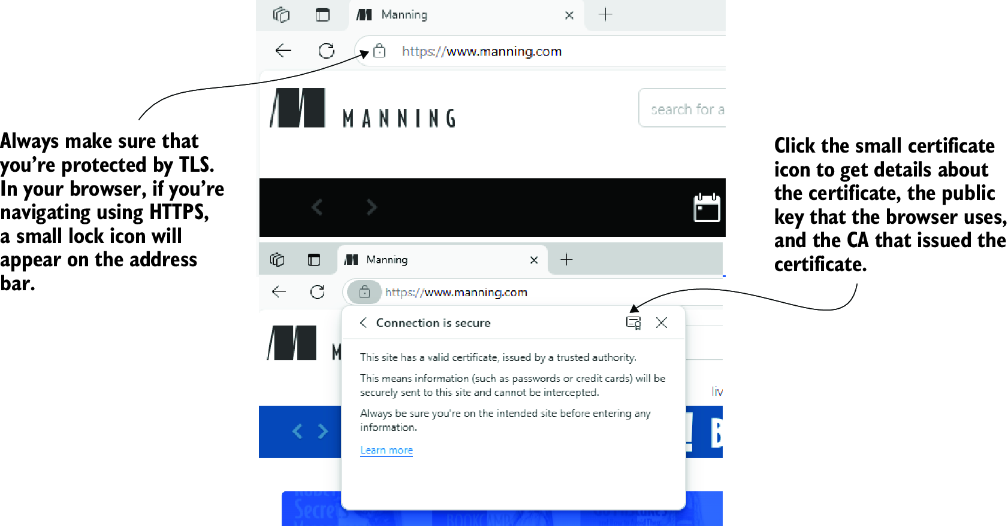
Inspect the browser padlock to view certificate details, including the issuing CA, public key, and secure-connection status. section 10.2.3

