A Spot Instance is an EC2 instance that uses spare AWS capacity at a substantial discount, but AWS can delay its launch or terminate it on short notice when capacity is needed. section 3.8 section 3.8.2
Use Spot Instances when workloads can tolerate interruption and restart:
- Process queued S3 object-scanning jobs for virus or malware detection. section 3.8.2
- Convert media files when an orchestrator can automatically restart failed jobs. section 3.8.2
- Handle portions of a fault-tolerant web application or run test systems where brief outages are acceptable. section 3.8.2
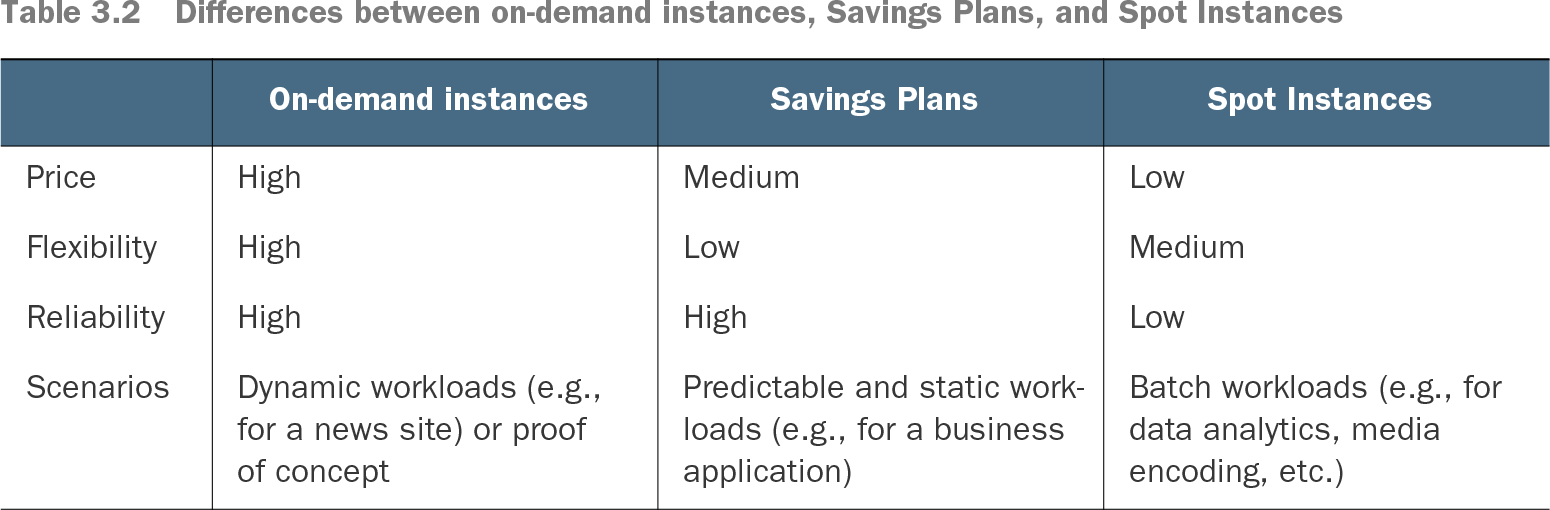
Spot capacity costs less than on-demand capacity but provides lower reliability. Unlike Savings Plans, it requires launching new instances and planning for interruption; it fits batch workloads better than critical, stateful services. section 3.8 section 3.8.2
Launching a Spot Instance
Open EC2 in the AWS Management Console, select Spot Requests, choose Request Spot Instances, select Manual Configure Launch Parameters, and choose an Amazon Linux 2 AMI. Plan for interruptions before launching. section 3.8.2
Table 3.2 Differences between on-demand instances, Savings Plans, and Spot Instances (view table figure)
| Dynamic workloads (e.g., for a news site) or proof of concept |
Predictable and static workloads (e.g., for a business application) |
Batch workloads (e.g., for data analytics, media encoding, etc.) |
Compare on-demand instances, Savings Plans, and Spot Instances by price, flexibility, reliability, and workload scenario. section 3.8