SQL Server is Microsoft’s relational database management system: a platform for building, hosting, and managing databases. Its scope extends beyond the Database Engine into reporting, data transformation, master data management, cloud integration, and analytics services. Treating it as “just a database” is the index mistake: it leads teams to underbudget development, operations, security, and specialist skills. section 1.1 section 1.2
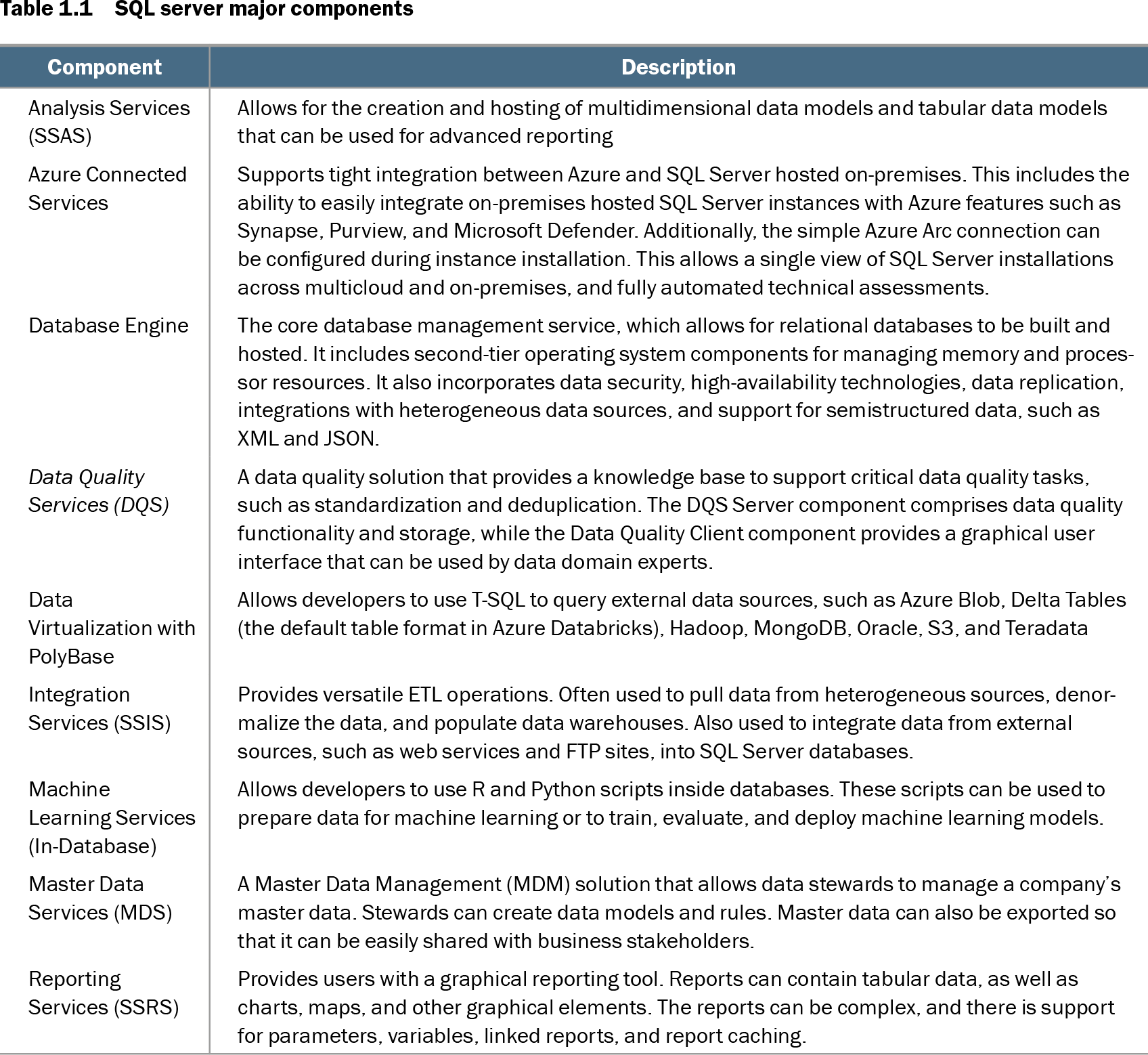
Table 1.1 SQL server major components (view table figure)
| Component |
Description |
|---|---|
| Analysis Services (SSAS) |
Allows for the creation and hosting of multidimensional data models and tabular data models that can be used for advanced reporting |
| Azure Connected Services |
Supports tight integration between Azure and SQL Server hosted on-premises. This includes the ability to easily integrate on-premises hosted SQL Server instances with Azure features such as Synapse, Purview, and Microsoft Defender. Additionally, the simple Azure Arc connection can be configured during instance installation. This allows a single view of SQL Server installations across multicloud and on-premises, and fully automated technical assessments. |
| Database Engine |
The core database management service, which allows for relational databases to be built and hosted. It includes second-tier operating system components for managing memory and processor resources. It also incorporates data security, high-availability technologies, data replication, integrations with heterogeneous data sources, and support for semistructured data, such as XML and JSON. |
| Data Quality Services (DQS) |
A data quality solution that provides a knowledge base to support critical data quality tasks, such as standardization and deduplication. The DQS Server component comprises data quality functionality and storage, while the Data Quality Client component provides a graphical user interface that can be used by data domain experts. |
| Data Virtualization with PolyBase |
Allows developers to use T-SQL to query external data sources, such as Azure Blob, Delta Tables (the default table format in Azure Databricks), Hadoop, MongoDB, Oracle, S3, and Teradata |
| Integration Services (SSIS) |
Provides versatile ETL operations. Often used to pull data from heterogeneous sources, denormalize the data, and populate data warehouses. Also used to integrate data from external sources, such as web services and FTP sites, into SQL Server databases. |
| Machine Learning Services (In-Database) |
Allows developers to use R and Python scripts inside databases. These scripts can be used to prepare data for machine learning or to train, evaluate, and deploy machine learning models. |
| Master Data Services (MDS) |
A Master Data Management (MDM) solution that allows data stewards to manage a company’s master data. Stewards can create data models and rules. Master data can also be exported so that it can be easily shared with business stakeholders. |
| Reporting Services (SSRS) |
Provides users with a graphical reporting tool. Reports can contain tabular data, as well as charts, maps, and other graphical elements. The reports can be complex, and there is support for parameters, variables, linked reports, and report caching. |
Compare the major components to distinguish the core Database Engine from services for reporting, data models, and Azure-connected operations. section 1.2
A SQL Server deployment can sit behind several applications rather than serving one isolated system. A cloud-hosted website may use Azure SQL Database, while manufacturing, inventory, and reporting workloads use databases on a shared SQL Server instance. Map these dependencies before choosing architecture, capacity, support ownership, or recovery arrangements. section 1.2
Avoid a weak implementation, which can turn a straightforward installation into an operational or security incident:
- Plan for distinct responsibilities across database development, administration, ETL, high availability, disaster recovery, and security; do not expect one inexperienced accidental DBA to cover every discipline. section 1.0 section 1.1
- Choose the data platform to fit the workload. Relational data may suit SQL Server, while naturally unstructured data may not; DBaaS also does not remove the need for optimized database code. section 1.3
- Select the operating system and host deliberately. SQL Server 2022 supports Windows and Linux, physical servers, virtual machines, Linux containers, cloud IaaS, and PaaS options. section 1.2.2
- Limit privileges and harden the instance: use least privilege, avoid unnecessary sysadmin access and xp_cmdshell, protect privileged accounts, and audit administrative activity. section 14.8
Choosing Linux rather than Windows
A Go application hosted on Ubuntu does not automatically require a Windows-based database tier. Running SQL Server on Linux can lower the environment barrier for Linux-focused teams and may avoid Windows Server licensing costs. Compare team skills, application platform, cost, support, and required SQL Server features rather than choosing Windows by habit. section 8.2 section 1.2.2
SQL Server is easy to start but difficult to implement well. Poor instance configuration can cause performance problems, data theft, ransomware exposure, regulatory noncompliance, data loss, and prolonged recovery; poor database code can add security breaches, unhandled failures, and maintenance cost. Build implementation decisions around availability, security, performance, and long-term operations—not installation convenience alone. section 1.4 section 1.5