SQL Server is Microsoft’s relational database management system. It is a practical choice for the board-game API because its records need a consistent structure and EF Core has a SQL Server provider maintained by the EF Core project. section 4.1.2
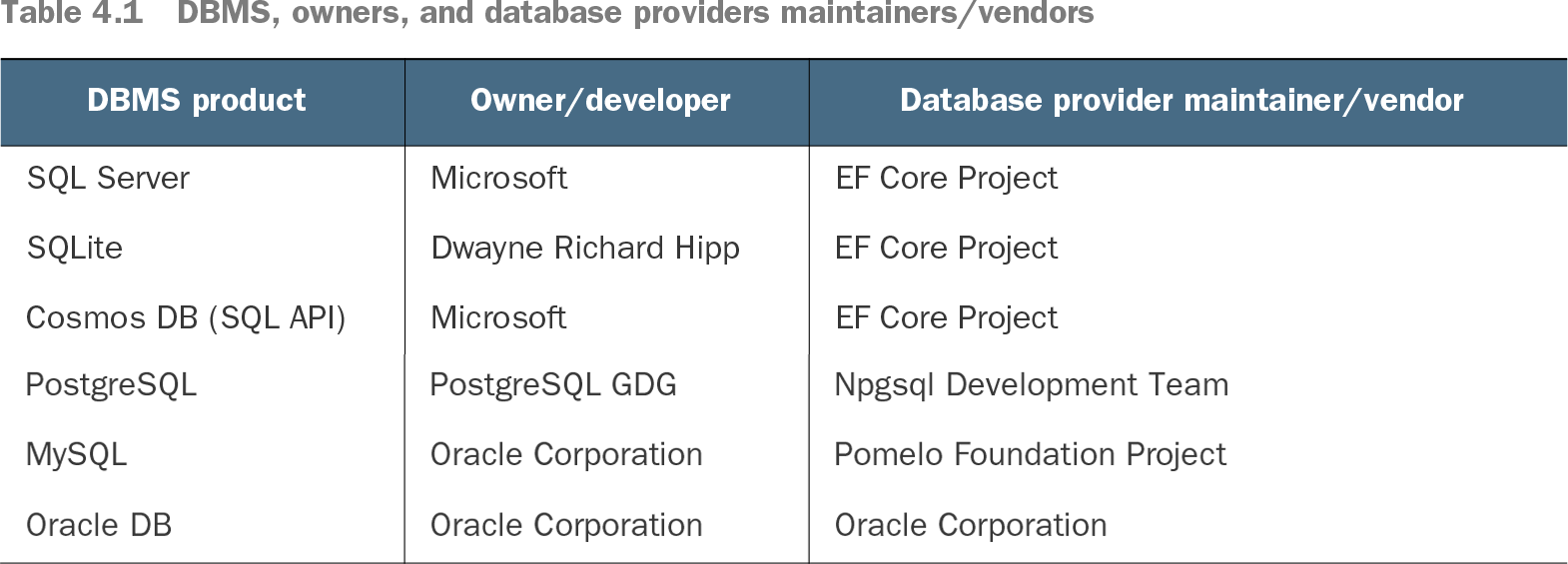
Table 4.1 DBMS, owners, and database providers maintainers/vendors (view table figure)
Compare SQL Server with other database products and see who maintains each EF Core provider. section 4.1.2
For development, a local SQL Server instance keeps database work straightforward. Developer edition has commercial-edition functionality but is limited to testing, education, and teaching. Express can serve small production applications, subject to size and performance limits. LocalDB needs little setup, but its limitations make it a poor production choice. A SQL Server Docker image is another development option. section 4.2.2
Set up the API database with SQL Server Management Studio (SSMS):
- Connect to the local database engine using <MACHINENAME>\SQLEXPRESS or .\SQLEXPRESS. Choose Windows or SQL Server authentication to match the installation settings. section 4.2.4
- Under Databases, select New Database, name it MyBGList, and keep the default settings. section 4.2.4
- Create a login for authentication to the SQL Server instance, then a user to authorize access to MyBGList. The API needs credentials for its connection string; the login and user have different scopes. section 4.2.4
For an on-premise production deployment, install SQL Server and create a separate MyBGList database with its own login and user. Give the production login a different password. SSMS can run on the server; connecting remotely instead requires opening TCP port 1433 and introduces additional security concerns. If remote access is necessary, restrict the inbound rule to the development machines’ IP addresses. section 12.3.6