liveBook · Manning

St.page_link

As explained in Build Python Web Apps with Streamlit

st.page_link is a Streamlit API function that renders a link for navigating between pages in a multipage application.

st.page_link renders a clickable link between pages in a Streamlit multipage app. Give it a configured st.Page object and label, such as st.page_link(pages["signup"], label="Don't have an account? Sign up!"). It can also receive a regular URL for external navigation. section 8.4.3

Use page links to make the next action obvious:

  • Add a signup link below a login form with pages["signup"]. section 8.4.3
  • Add a login link below a signup form with pages["login"]. section 8.4.3
  • Keep shared page definitions in a pages module, then select navigation options according to session state. section 8.4.3 section 8.7
Figure 8.8 Diagram showing the connections between pages via redirection and page links
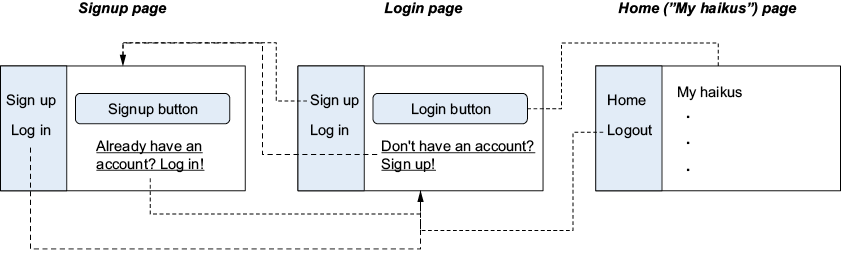
A page-connection diagram helps distinguish direct page links from the navigation bar and redirection flow. section 8.4.3

How Build Python Web Apps with Streamlit covers it

How deep it goes
Explains the two main arguments and external URLs, then applies links within login, signup, and dynamic-navigation flows.
Examples
Uses login-to-signup and signup-to-login links alongside session-dependent home, logout, login, and signup navigation.
What it assumes
Assumes basic Streamlit pages and introduces st.Page and st.navigation as the surrounding multipage-app mechanisms.
What you can do after
Apply st.page_link to connect configured Streamlit pages and external URLs in an authentication flow.
How it connects
Connects st.Page, st.navigation, session state, authentication, and multipage applications.

Related concepts

This explainer was generated by Manning's knowledge graph from the text of Build Python Web Apps with Streamlit. The section links point to the parts of the book it draws on.