A stacked area chart represents multiple series as adjoining filled areas over an ordered dimension. Each layer accumulates on the layers below, while its thickness represents the series value. With a baseline at zero, it is a stacked area chart; a streamgraph shifts the areas around a central baseline. section 5.2 section 5.2.3
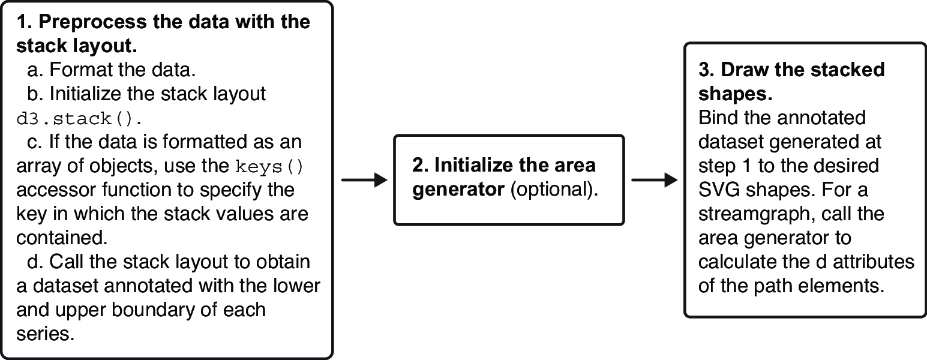
Build the chart in D3 through four connected steps:
- Initialize d3.stack(), configure its keys, and pass in the original dataset. section 5.2
- Use the annotated output, whose points contain lower and upper boundaries, to establish the vertical scale. section 5.2.3
- Configure d3.area() with x, y0, and y1 accessors, then bind each series to an SVG path. section 5.2.3
- Control visual interpretation with stack order and offset: order changes vertical arrangement, while offset changes the baseline and distribution. section 5.2.4
A D3 stacked area implementation
const stackGenerator = d3.stack().keys(formatsInfo.map(f => f.id)); const annotatedData = stackGenerator(data); const areaGenerator = d3.area() .x(d => xScale(d.data.year) + xScale.bandwidth() / 2) .y0(d => yScale(d[0])) .y1(d => yScale(d[1])) .curve(d3.curveCatmullRom); innerChart.append("g") .selectAll("path") .data(annotatedData) .join("path") .attr("d", areaGenerator) .attr("fill", d => colorScale(d.key)); For a streamgraph-style result, add an order such as d3.stackOrderInsideOut and an offset such as d3.stackOffsetSilhouette, then expand the y-scale domain to include lower and upper boundaries. section 5.2.3 section 5.2.4
Figure 5.12 The steps to creating a stacked chart with D3
Use the construction sequence to connect stack generation, boundary-based scaling, area paths, and baseline positioning. section 5.2
