A streamgraph is a flowing, stacked area chart for showing how quantities change across an ordered dimension such as time. Its layers accumulate around a baseline, creating an organic appearance while remaining closely related to stacked bar charts and area charts. section 5.2
Build a streamgraph in D3 through these steps:
- Initialize d3.stack(), configure its keys, and pass in the original dataset to produce annotated series with lower and upper boundaries. section 5.2
- Create a linear vertical scale whose domain covers the stacked boundaries. section 5.2.3 section 5.2.4
- Configure d3.area() with x, y0, and y1 accessors, then bind each annotated series to an SVG path. section 5.2.3
- Add axes and labels, using tick values and styling to keep the chart readable. section 5.2.3
Minimal D3 construction
const stackGenerator = d3.stack().keys(formatsInfo.map(f => f.id)); const annotatedData = stackGenerator(data); const areaGenerator = d3.area() .x(d => xScale(d.data.year) + xScale.bandwidth() / 2) .y0(d => yScale(d[0])) .y1(d => yScale(d[1])) .curve(d3.curveCatmullRom); innerChart.append("g") .selectAll("path") .data(annotatedData) .join("path") .attr("d", areaGenerator) .attr("fill", d => colorScale(d.key)); section 5.2.3
Figure 5.12 The steps to creating a stacked chart with D3
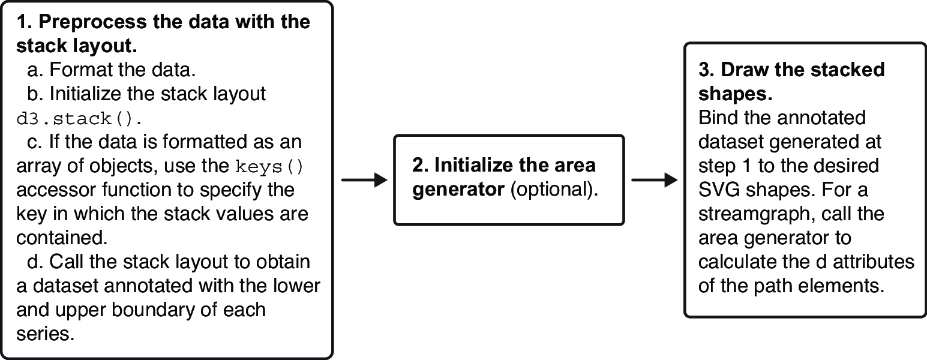
Use the construction sequence as a visual checklist: stack the data, calculate boundaries, generate areas, and bind paths. section 5.2
Figure 5.20 D3 allows controlling how the shapes are positioned in regard to the baseline with the offset() accessor function. Here we see examples with stacked areas and stacked bars.
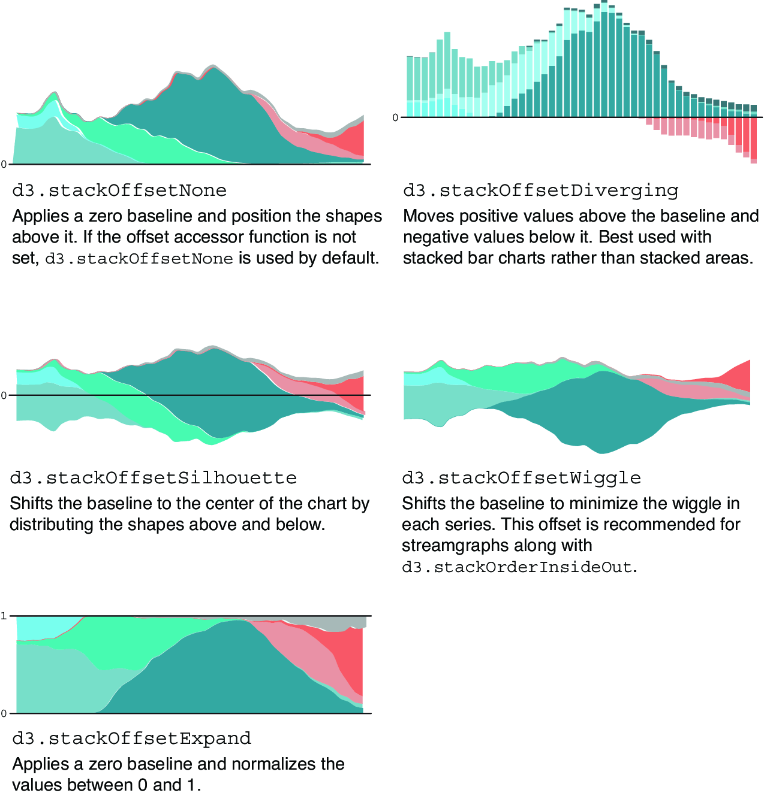
Compare baseline offsets to see how silhouette, wiggle, diverging, and normalized layouts change the chart’s shape and interpretation. section 5.2.4
