An area generator, created with d3.area(), calculates the d attribute for an SVG path that fills the region between two boundaries. It replaces hand-written path commands with accessor functions that turn data values into positions. section 4.3 section 4.5
Most vertical areas use x() for each point’s horizontal position, y0() for the lower edge, and y1() for the upper edge. The two edges can represent a range, such as minimum and maximum temperature. For horizontally bounded areas, use x0(), x1(), and y() instead. section 4.3.1 section 4.5
Figure 4.19 Area generator d3.area() is used in combination with three or more accessor functions. To draw the area between the minimum and the maximum temperatures, we use x(), y0(), and y1(). The first one calculates the horizontal position of each data point, the second the vertical position of the data points on the lower boundary (here, the minimum temperature), and the third one the vertical position of the data points on the upper edge (here, the maximum temperature).
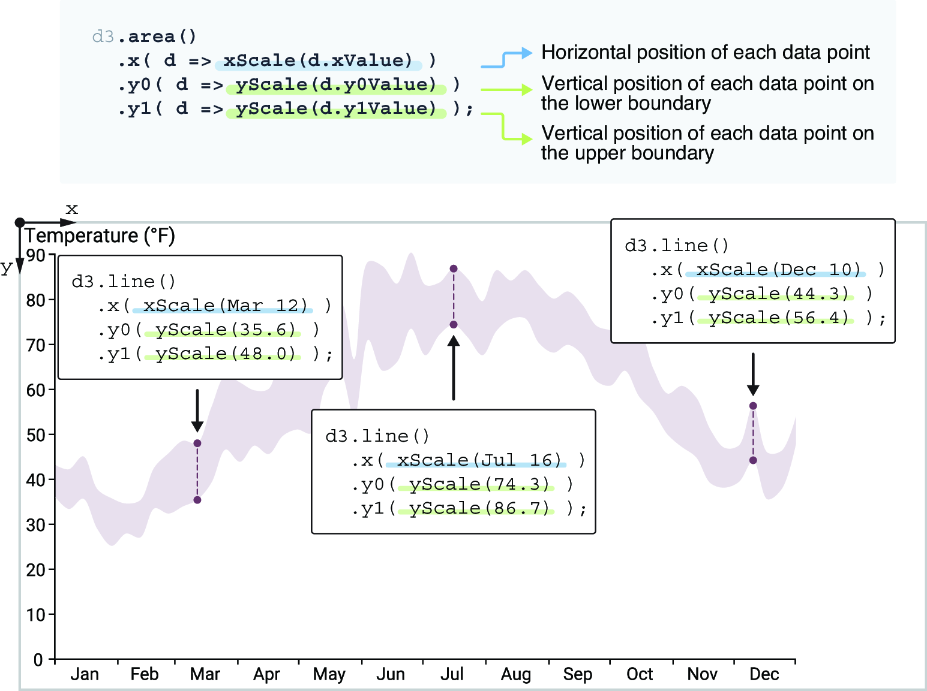
The three accessors map each datum to one shared horizontal position and two vertical boundaries, defining the filled region. section 4.3.1
Temperature range behind a line chart
Create an area generator with date, minimum-temperature, and maximum-temperature scales. Append its path before the average-temperature line so the translucent fill remains behind the line. A curve() call can smooth both boundaries; fill and fill-opacity keep the range visible without hiding the line. section 4.3 section 4.3.1
Build an SVG area path in four steps:
- Initialize the generator with d3.area(). section 4.5
- Define accessors for one coordinate and the two opposing boundaries. section 4.3.1
- Optionally chain curve() to interpolate the boundaries. section 4.3.1
- Append a path and set d by calling the generator with the dataset. section 4.3.1
The same pattern supports more than range bands. A streamgraph uses stack-layout output as lower and upper boundaries for each series, while a violin plot uses two horizontal boundaries around a centerline to form its silhouette. In each case, the generator converts paired edges into a path. section 5.2.3 section 6.5
const areaGenerator = d3.area()
  .x(d => xScale(d.data.year) + xScale.bandwidth()/2)
  .y0(d => yScale(d[0]))
  .y1(d => yScale(d[1]))
  .curve(d3.curveCatmullRom);
This streamgraph generator reads a band-scaled year and the stacked lower and upper values, then smooths each area path. section 5.2.3
