A D3 shape generator turns data into the SVG path instructions stored in a path element’s d attribute. It avoids hand-writing long path commands: d3.line() reads each point’s horizontal and vertical positions and returns a path that passes through them. section 4.0 section 4.2.1
Build a line generator by calling d3.line(), then provide x() and y() accessors. Each accessor receives a datum and commonly sends one of its values through a scale. Call the finished generator with the dataset, assign the returned string to d, and use fill="none" plus a stroke color to reveal the line. section 4.2.1 section 4.5
Temperature line chart
For weekly New York City temperatures, x(d => xScale(d.date)) places each date and y(d => yScale(d.avg_temp_F)) places its average temperature. Appending one path with d set to lineGenerator(data) connects the plotted points into a temperature-over-time chart. section 4.2 section 4.2.1
Add curve(interpolator) when a curved representation is appropriate. D3 offers several interpolators, but curves alter the visual representation of data, so compare them against the actual points and choose carefully. curveMonotoneX and curveCatmullRom can closely follow points; other choices may understate or reduce variation. section 4.2.2
A line generator also works when a frontend framework owns the DOM. Keep D3 for calculations, generate the d value, and render the path in framework markup. For incomplete series, defined() can handle data points whose required value is missing. section 8.6 section 8.6.3
Figure 4.14 Line generator d3.line() is used in combination with two accessor functions, x() and y(), that respectively take the horizontal and vertical position of each data point as arguments.
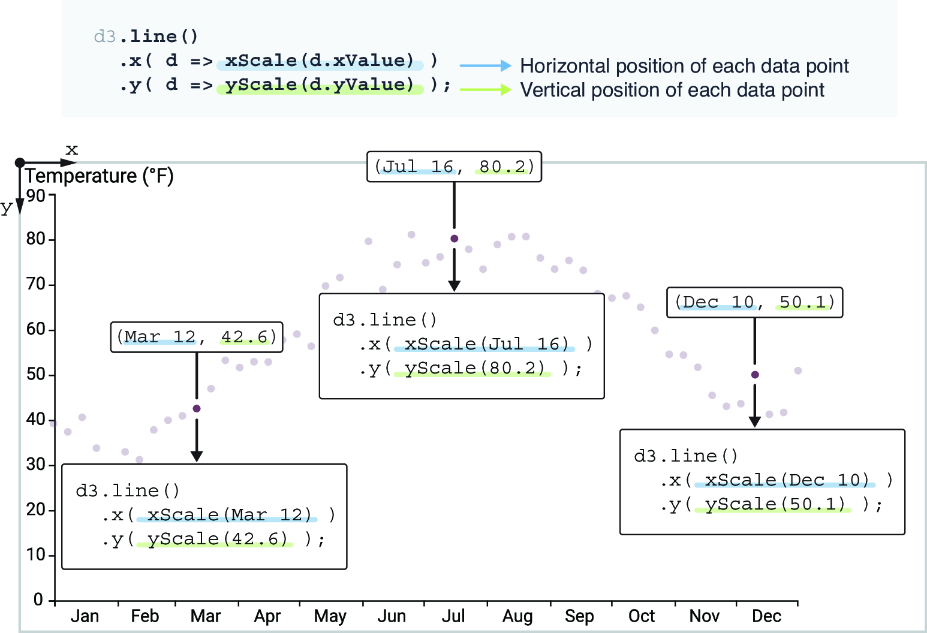
See how d3.line() combines x() and y() accessors before its output is assigned to an SVG path. section 4.2.1
