An SVG <path> draws flexible shapes that primitive elements such as <line>, <rect>, and <circle> cannot easily express. Its shape comes from the d attribute: a sequence of commands that sets a starting point and endpoint, changes direction with curves, and can leave the path open or close it into a shape. section 4.0
A path can be styled like other SVG shapes. Use fill="none" when the visible result should be only an outline, then use stroke and stroke-width to make the line visible and control its thickness. section 1.2.2
Drawing a curved path
This path starts at 680,150 with M, curves through control points with C, and continues with S. The stroke makes the curve visible while fill="none" prevents an interior fill. <path d="M680 150 C 710 80, 725 80, 755 150 S 810 220, 840 150" fill="none" stroke="#773b9a" stroke-width="3" /> section 1.2.2
Writing d strings by hand is practical for simple paths but quickly becomes difficult as shapes gain commands and curves. D3 shape generators can produce path data for visualization forms such as line-chart lines and curves, areas, and arcs. section 4.0
Figure 4.1 Project that we’ll build in this chapter: a line chart of the temperature evolution in New York City in 2021 and a set of arcs showing the percentage of days with precipitation
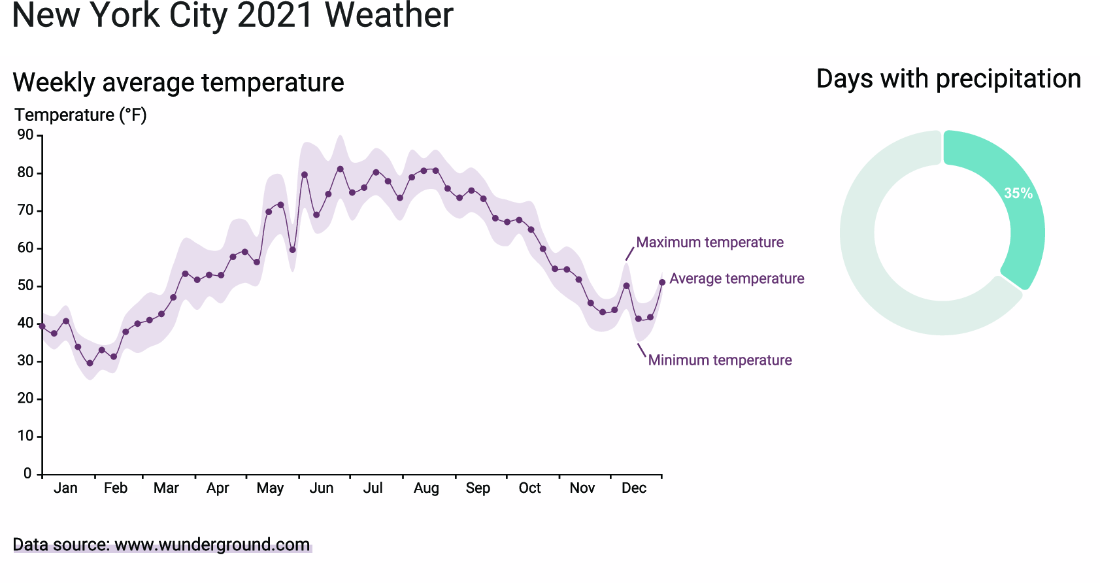
See paths used as chart marks: a temperature line and precipitation arcs. section 4.0
