An arc generator is a D3 function, created with d3.arc(), that computes the SVG d path data needed to draw circular slices and ring-shaped arcs. It replaces long, hand-written SVG path commands with radius and angle settings. section 4.0 section 4.4.2
Use arcs when showing how amounts relate to a total: pie charts, donut charts, sunburst diagrams, Nightingale rose charts, and custom radial visualizations. An inner radius of 0 creates a pie slice; a positive inner radius creates a donut-shaped slice. section 4.4 section 5.1.3
Build an arc by configuring the generator and then supplying its angle span:
- Create d3.arc() and set innerRadius() and outerRadius() in pixels. section 4.4.2
- Use angles in radians. A full circle ends at 2 * Math.PI; an arc beginning at 0 starts at 12 o’clock. section 4.4.1 section 4.4.2
- Optionally use padAngle() for gaps and cornerRadius() for rounded corners. section 4.4.2
- Append an SVG path and set its d attribute by calling the generator with startAngle and endAngle values. section 4.4.2
A precipitation donut arc
A 35% precipitation share can run from startAngle: 0 to an end angle derived from 35% of a circle. A second gray arc begins at that end angle and continues to 2 * Math.PI, making the remaining days visible. section 4.4 section 4.4.1 section 4.4.2
For data-driven pie or donut charts, a pie layout can provide startAngle and endAngle on each annotated data object. Configure the arc generator to read those properties, bind the objects, and use the generator directly as the d attribute value. section 5.1.3 section 5.4
Call centroid() on a configured arc generator to get a two-value [x, y] midpoint relative to the chart origin. Use that position for a centered SVG text label, helping readers interpret percentages that may be difficult to estimate from angles alone. section 4.4.3 section 5.1.4
Figure 4.26 The arc generator uses multiple accessor functions to compute the d attribute of an arc. Here we set its inner radius, outer radius, padding angle, and corner radius during the generator declaration. We’ll pass each arc’s start and end angles when we append the path element to the chart.
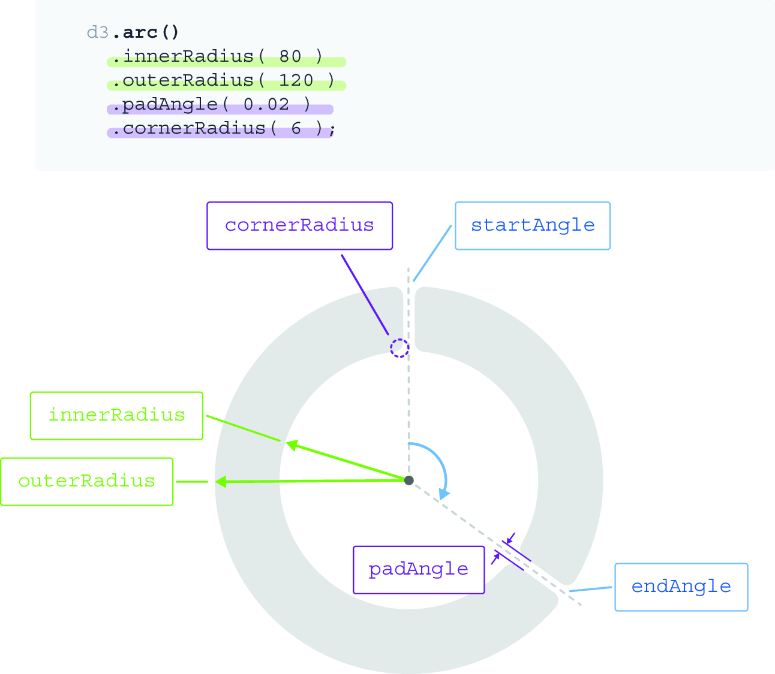
Inspect how inner radius, outer radius, padding angle, corner radius, and per-arc angles combine to define an SVG arc path. section 4.4.2
