A staging environment is a pre-production execution environment where a deployable version is installed and validated before it moves to production. It sits after test deployment and before production, providing checks beyond CI workflows: confirm deployment, healthy runtime state, and primary user flows. Automated end-to-end tests can perform those checks, while manual or automated approvals can control progression between stages. section 9.1.1
A practical staging workflow is:
- Retrieve deployment artifacts prepared during CI and deploy them to an internal staging server. section 9.1.1
- Wait for readiness or health checks, then run end-to-end tests against the deployed application. section 9.1.1 section 9.3.7
- Promote only after validation, using an approval process or a deployment strategy that controls how traffic reaches the new version. section 9.1.1 section 9.3.7
In a red–green deployment, staging can be the inactive server or deployment slot. The new version is deployed there while production traffic remains on the active version. After validation, a small percentage of traffic is routed to staging and monitored through application telemetry. Traffic increases in chosen steps when no problems appear; a virtual IP swap then makes the new version production and returns the old server to staging for the next release. section 9.3.7
Validate a deployment slot before routing traffic
A workflow creates an Azure Web App staging slot, deploys the application, and exposes its URL as a job output. A validation job polls the /health/ready endpoint until it reports Healthy, then runs Playwright tests. Subsequent jobs route 10% and then 30% of traffic to the staging slot before swapping the slot into production and clearing routing rules. section 9.3.7
Figure 9.5 Environment setup
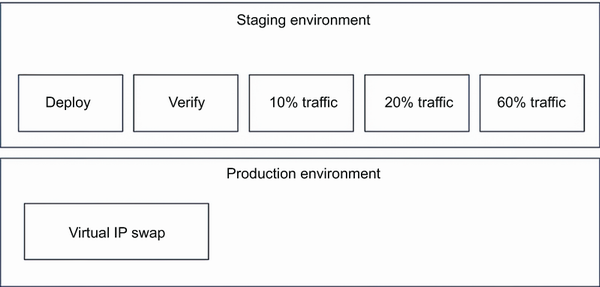
The environment setup diagram clarifies the red–green arrangement: one server receives production traffic while the other hosts and validates the staged version. section 9.3.7



