A standby router is an HSRP router that monitors the active router and waits to assume packet forwarding if it fails. The active router serves as the LAN’s default gateway, while the standby remains ready for automatic takeover. section 19.1.2 section 19.2.1
HSRP routers maintain their neighbor relationship with multicast hello messages. They share a virtual IP address (VIP) and virtual MAC address, so hosts continue using the same default gateway when the standby becomes active. section 19.1.2 section 19.4
During a failure and recovery, the standby router behaves as follows:
- Detects the active router’s failure and takes over the active role; this transition is called failover. section 19.1.3
- Sends gratuitous ARP messages after takeover so switches relearn the virtual MAC address on the new active router’s port. section 19.1.3
- Leaves hosts’ default-gateway IP and ARP mappings unchanged because the VIP and virtual MAC remain the same. section 19.1.3
- May remain active after the original router recovers, because HSRP preemption is disabled by default; enabling preemption allows the higher-priority router to reclaim the role. section 19.2.1 section 19.4
Two-router HSRP group
R1 uses 10.0.0.2, R2 uses 10.0.0.3, and both configure 10.0.0.1 as the group’s VIP. Giving R1 priority 105 makes it active while R2, with the default priority 100, remains standby. The command `standby 1 preempt` permits R1 to retake the active role after recovery. section 19.3
Figure 19.4 An FHRP failover. (1) A hardware failure occurs on R1. (2) R2 takes over as the active router. (3) R2 sends GARP messages, sourced from the virtual MAC and destined for the broadcast MAC. (4) The switches learn the virtual MAC on the appropriate ports—those leading toward the new active router. (5) End hosts’ default gateways and ARP table entries for the VIP remain the same.
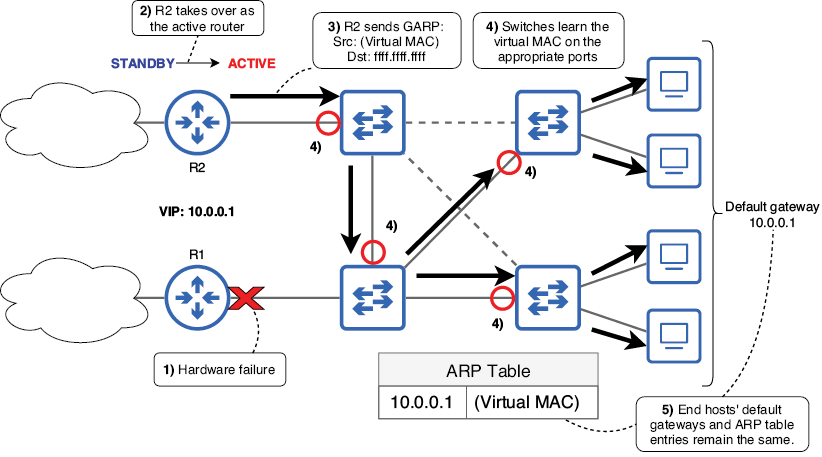
Follow the failover sequence from hardware failure through standby takeover, gratuitous ARP, switch relearning, and unchanged host gateway settings. section 19.1.3
