A static secure MAC address is manually configured on a port and stored in both the MAC address table and the running configuration. It lets Port Security specify exactly which device may connect, rather than accepting any dynamically learned address. section 12.1.2 section 12.2.3
Apply these operational rules when configuring static secure MAC addresses:
- Use switchport port-security mac-address mac-address in interface configuration mode; add the voice VLAN keywords when the address belongs to the port’s voice VLAN. section 12.1.2 section 12.3
- Count static and dynamic secure MAC addresses together against the port’s maximum, so one static address leaves only the remaining capacity for dynamic learning. section 12.1.2
- Keep a static address across a port outage; unlike a dynamic secure address, it remains configured until manually removed. section 12.2.3
- Leave static aging disabled by default; enable it per port with switchport port-security aging static when automatic removal is required. section 12.2.2
Server and phone-port configuration
A server connected to F0/4 can be restricted to one manually configured MAC address. On F0/5, configure the phone’s MAC address statically while allowing the connected PC’s MAC address to be learned dynamically. Both addresses still consume the port’s maximum. section 12.1.2
Figure 12.5 Configuring static secure MAC addresses. There can be a mix of static and dynamic secure MAC addresses on a port, as in F0/5’s case.
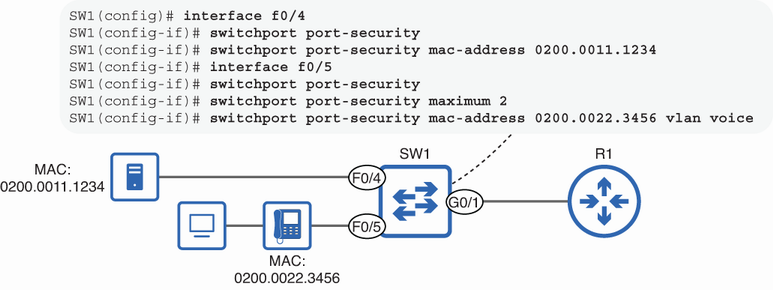
Use the topology figure to compare a port restricted to one static device with a port combining static and dynamic secure MAC addresses. section 12.1.2
Verify secure addresses with show mac address-table secure, where secure entries appear with type STATIC, or show port-security address, where manually configured entries appear as SecureConfigured. section 12.1.2
