A step definition is reusable automation code that runs in response to a scenario step. It connects the step’s wording to an action or check, helping turn scenarios into executable tests. section 12.3.2 section 12.6
A scenario automation tool matches each step’s text against registered expressions, then calls the corresponding definition. A definition is often a named method, though some tools use anonymous methods. New scenarios can reuse definitions already written for other scenarios. section 12.3.2
Matching must identify exactly one definition:
- No match produces an undefined-step error; more than one match produces an ambiguous-step error, and execution terminates. section 12.3.5 section 12.6
- Alternatives, optional text, parameters, and custom parameter types make expressions harder to reason about. Prefer multiple simple expressions over complicated matching logic that is difficult to debug. section 12.3.5
Changing an image color
A step definition can match a color-change step using either a color name, such as yellow, red, or blue, or a hexadecimal RGB value. Custom parameter types can represent these alternatives. section 12.3.5
Figure 12.4 Conceptual approach for matching step text to step definition
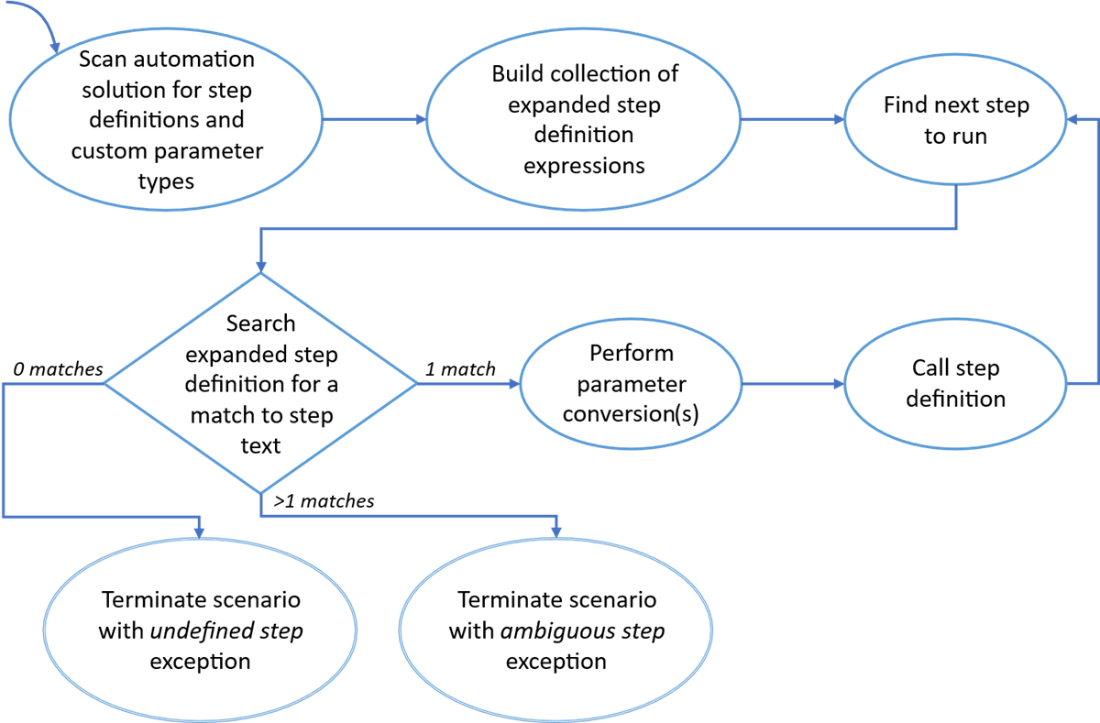
See the conceptual matching flow from step text to a registered definition. section 12.3.5