liveBook · Manning

Blob container

As explained in Bootstrapping Microservices, Second Edition: With Docker, Kubernetes, GitHub Actions, and Terraform

A storage container is a logical Azure Storage location that organizes stored files or blobs.

A blob container is a logical Azure Storage location, similar to a directory, for organizing files called blobs. It belongs to a storage account and is separate from an application container used to run a microservice. section 4.4.1

Create and use a container through the Azure portal:

  • Open the storage account and select Containers. section 4.4.1
  • Create a container named videos and retain Private Access Only. section 4.4.1
  • Open the container and upload a video file; the uploaded file appears as a blob. section 4.4.1

videos container

A videos container stores a test video for retrieval by a microservice. The service authenticates with the storage account name and an access key, then reads the stored video. section 4.4.1
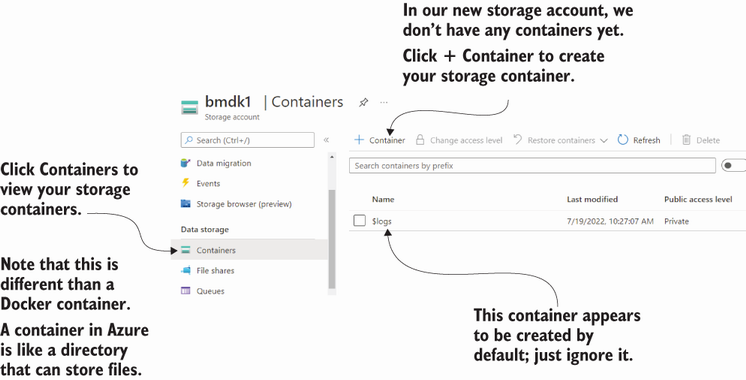
Figure 4.9 Navigating to the Containers option and creating our videos container

Shows the Azure portal workflow for locating Containers and creating the videos container. section 4.4.1


How Bootstrapping Microservices, Second Edition: With Docker, Kubernetes, GitHub Actions, and Terraform covers it

How deep it goes
Defines the directory-like role and demonstrates portal creation, access selection, upload, and microservice retrieval.
Examples
Uses a private videos container containing an uploaded test video.
What it assumes
Assumes an Azure storage account exists and teaches container creation and file upload through the portal.
What you can do after
Operate/configure a private Azure Storage container and upload files for a microservice to retrieve.
How it connects
Connects storage accounts, blobs, access levels, Azure Storage authentication, and microservices.

Also explained in

Compare how 2 books explain blob container →

Related concepts

This explainer was generated by Manning's knowledge graph from the text of Bootstrapping Microservices, Second Edition: With Docker, Kubernetes, GitHub Actions, and Terraform. The section links point to the parts of the book it draws on.