A storage integration is a Snowflake account object that authenticates Snowflake to external cloud storage. It encapsulates access information, can permit reads and optionally writes through external stages, and restricts stage creation to configured storage locations. This separates cloud credentials from stage definitions and leaves cloud administrators in control of Snowflake access. section 3.1.1 section 3.1.3
Use a storage integration when building a repeatable cloud-file ingestion pipeline. Create an external stage with the integration, load staged files into a staging table with COPY, then insert or merge into a target table. Direct credentials remain an alternative for quick testing or proof-of-concept work, where supported. section 3.0 section 3.5
Creating and using an integration follows this operational sequence:
- Provision the cloud storage resources and collect provider-specific identifiers, such as an Azure Tenant ID, storage account, and container, or an AWS IAM role ARN and S3 bucket. section 3.1.1 section 4.1.1
- Create the integration with TYPE = external_stage, a provider, enabled status, and allowed storage locations; inspect its properties with DESCRIBE STORAGE INTEGRATION. section 3.1.1 section 4.1.1
- Complete cloud-provider authorization. In Azure, an administrator grants privileges to the Snowflake application; in AWS, permissions establish access to bucket objects and a trust relationship. section 3.1.1 section 4.1.1
- Grant USAGE on the integration to the role that creates the stage, then create the stage with storage_integration and a cloud-storage URL. section 3.1.2 section 4.1.1
Azure external stage
An ACCOUNTADMIN creates BISTRO_INTEGRATION for an Azure container and grants SYSADMIN usage. SYSADMIN can then create BISTRO_STAGE with `storage_integration = BISTRO_INTEGRATION` and list the available files. The allowed location limits where stages using that integration may point. section 3.1.1 section 3.1.2
Figure 3.1 A data pipeline that takes CSV files from a cloud storage location makes the files available to Snowflake in an external stage, either by using a storage integration object or by providing credentials, loads the data into a staging table, and inserts or merges the data from the staging table into the target table.
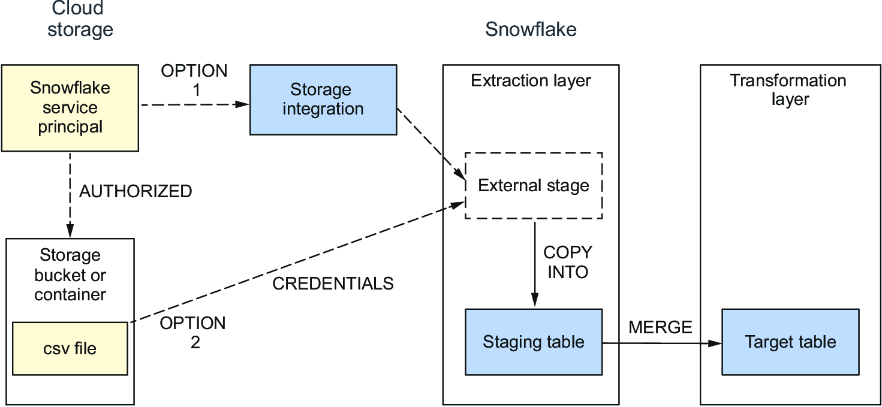
Follow the integration’s place in the end-to-end path: cloud files become an external stage, then a staging table, then target-table inserts or merges. section 3.0
