A stream processor applies SQL-style logic to events held in Fluent Bit buffers. It can query, filter, aggregate, and generate event streams while data moves through an observability pipeline. No database is involved: streams or tags act like tables, and event attributes act like columns. section 8.2 section 1.3.4
The processor is a separate subsystem triggered through the buffer storage interface. This makes buffering more than protection against input and output rate differences: buffered events are the data pool used by processor tasks. Buffer storage may be memory or filesystem, with file storage preserving data across a Fluent Bit restart at a performance cost. section 8.2 section 1.2.2
Define each task in a stream configuration file with a name and an SQL-like expression. Core choices are:
- Query a source with SELECT. Results from a basic SELECT are written to stdout as calculations occur, rather than waiting for the service flush interval. section 8.3
- Use TAG:'name' to process one or more sources sharing a tag, or STREAM:name to select one uniquely identified source. Stream names are immutable; tags can be shared and manipulated by filters. section 8.6
- Use WHERE to retain events relevant to a calculation, and functions such as count and average to derive values from matching events. section 8.10
- Add a hopping or tumbling WINDOW when aggregating. Hopping windows cost more computation but provide more granular analysis and are less likely to miss fluctuations. section 8.10
- Create a derived stream with CREATE STREAM ... AS SELECT. Assigning a tag makes its output behave like an implied input that can match output plugins. section 8.7
Count events and route a threshold result
A task can create an untagged stream that counts random values above a threshold in a five-second tumbling window. Later tasks consume that stream and create tagged outputs for counts greater than two or counts of two or fewer. Output plugins matching those tags receive only the corresponding derived events. section 8.8
Use processors for local analytics such as translating occurrences into metrics, detecting too-few or too-many events, enriching downstream processing with calculated values, or checking warning counts and upstream heartbeats. Chain untagged streams for more sophisticated processing, then tag the final stream when it must enter the wider plugin pipeline. section 8.10 section 11.7
A stream processor is not a general-purpose streaming platform. It cannot use data from one stream to inform another, even though processor-created streams can be chained. Treat it as buffered Fluent Bit event processing rather than a substitute for Apache Spark or Kafka. section 8.10
Figure 8.5 Sequence and tagging of plugins and stream processors. The stream processor tasks in the middle of the flow are shaded to distinguish them. Note that createCountStream doesn’t tag its output.
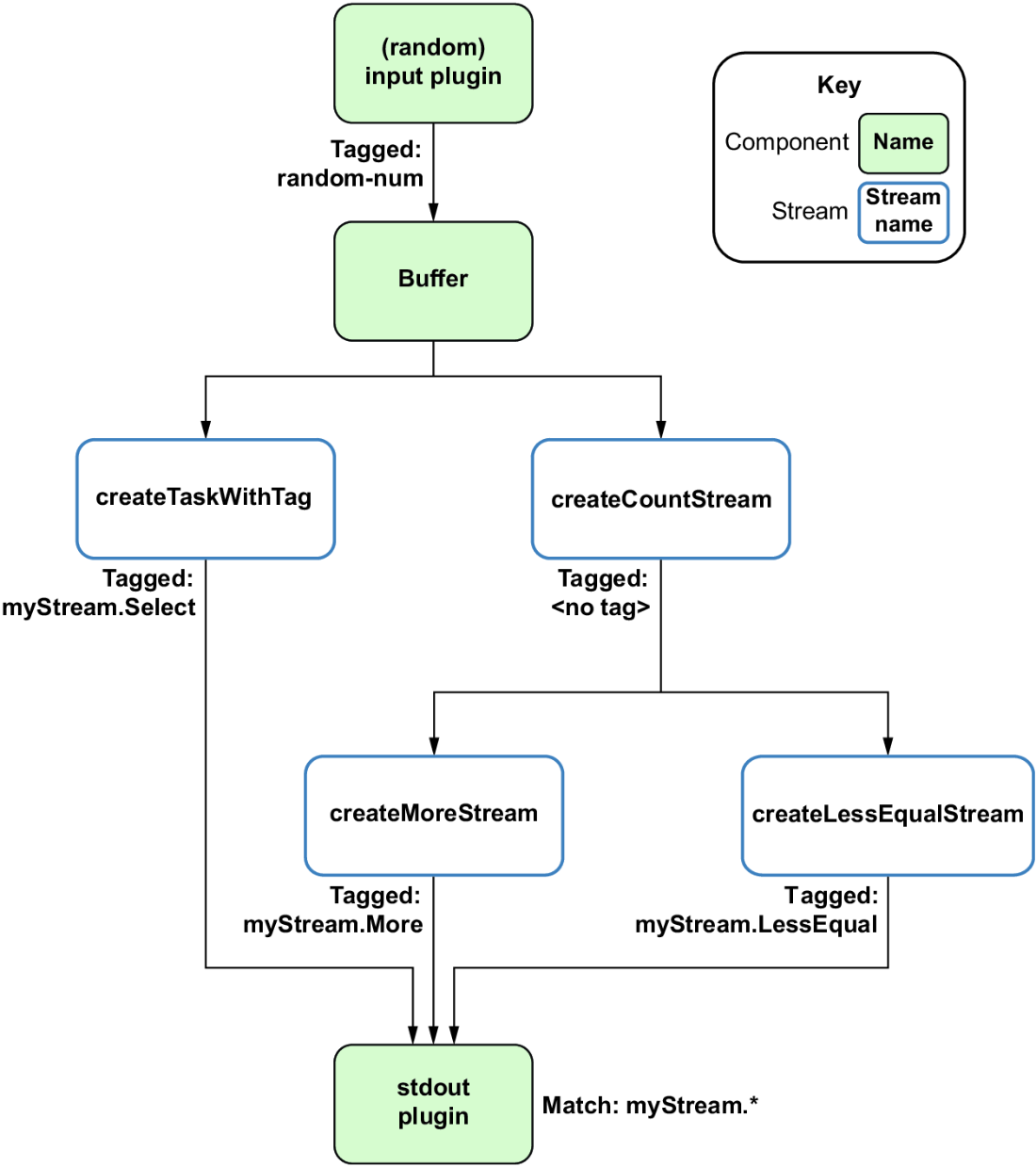
Follow the event path through chained processor tasks and see why the intermediate count stream remains untagged while threshold results are routed by tags. section 8.8


